|
| |
|

|
Asher
|
 |
Calgary, Alberta
Nov 1999
time: 22:31
|
|
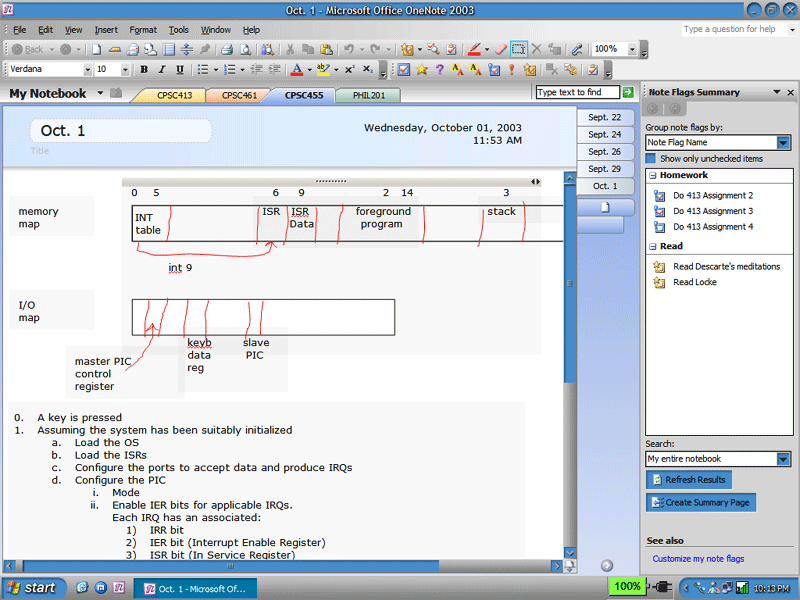
I've been using this new program daily for a few weeks now on my laptop. I take notes in all of my classes in it.
It's a new application in Microsoft Office 2003. At first a lot of people confuse it with Word, but it's quite a bit different.
There's no Save button in OneNote. It always saves.
You can integrated audio notes by simply clicking the mic button and talking, then hit end, and it inserts a notation with a button to play it, whereever the cursor was at the time.
You can move around anything: single lines of text, block of texts, etc, by clicking on the little move icon to the left of every line. Unlike Word you don't need to pad with whitespace, wherever you click it'll type.
You can draw anywhere at any time with the pen. If you've got a tablet PC you can use your stylist to write on the screen anywhere without interfering with pictures of text on it, otherwise you use the mouse to draw.
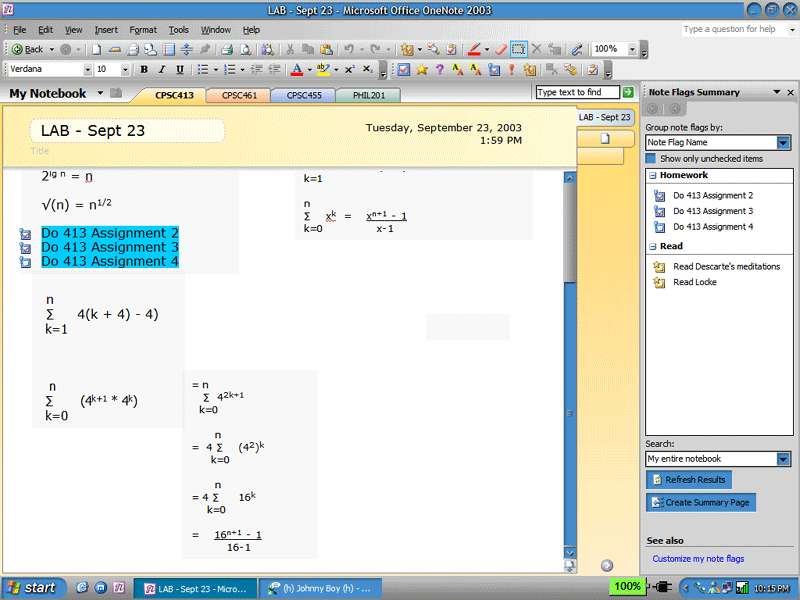
It has customizable "flags" which allow you to annotate features (Homework, Read, Definition, Theorem, Important, etc). Then you can use the Flag View to view flags in a variety of ways. I use View Flag Type, so it'll list all of my homework, reading assignments, etc. Then I click off the homework when I'm done.
Integrates with Outlook: Click a button on the toolbar and it creates an Outlook task.
Sections: All of my subjects across the top of the screen with tabs.
Pages: Can easily create and move pages via the right-side tabs (can change to other locations on the screen)
Very cool and powerful "search" function.
It's now my most-used MS Office app, beating Word and Outlook by a longshot. 
 Attachment: onenote.png Attachment: onenote.png
This has been downloaded 177 time(s).
|
|
| |
|
|
|
Asher
|
|
Calgary, Alberta
Nov 1999
time: 22:31
|
|
And Paul Thurrott has a review from the beta:
quote:
I probably spend about half of my work-related life taking notes in Word while speaking to representatives from Microsoft or other companies either in person or on the phone. As a result, I've developed into a fairly speedy typist, and I have hundreds of different Word documents scattered around my hard drive, with notes from these meetings. At Fall COMDEX 2001, however, I got my first look at a new Microsoft Office application called OneNote, designed specifically for note-taking. After hours of time with the OneNote team, I was eager to adopt the application and begin using it, instead of Word, to takes notes. Beginning with Office 2003 Beta 2, I finally got my chance.
In Microsoft's words, OneNote includes all of the standard typing and formatting features that you would expect from Word, plus tabs for sections and pages that make it easy to work with multiple documents--called notes--at once (Figure). You can click and type or draw with the mouse anywhere on a page, just as you would with paper, and once you have written something, it is saved automatically. You can mark notes that are important to review or require follow-up, and OneNote will summarize them across all your notes. You can easily search through all your notes, and you can e-mail notes directly from within OneNote. And if you have a Tablet PC, you can handwrite notes in OneNote, of course (Figure).
OK, that's a fairly concise, and even accurate, description. But the true beauty of OneNote is the seamless way it works. "OneNote is a new Office family application," Chris Pratley, an Office Product Manager, told me recently. "We generated the idea for OneNote about two years ago when planning began for Office 11. We were thinking about how people really work, what people do all day. A lot of people spend a considerable amount of time taking notes. And every once in a while, you make a document out of those notes."
OneNote works with four basic types of notes: typing, handwriting, drawings, and audio. "And it ties them all together," Pratley told me. "If your notes are on paper, it's no good because you can't find them later. Electronically, at least the notes are there in the computer, but you still can't find them. OneNote gives you an easy way to search notes, and actually use them as a resource, or personal database, where you can refer back later." |
|
|
| |
|
|
|
Zopperoni
|
|
I have OneNote, but still have to around using it.
|
|
| |
|
|
|
Q Cubed
|
 |
t3h y3ll0w p3ril
Apr 1999
time: 23:31
|
|
if you're lucky enough to work for a place with enterprise licensing agreements (like myself), you can download it from the licensing website, where it's been availible since early september.
i must say, i just installed office 2003 yesterday (one one computer, to see if it might be worth it to roll out on the others), and onenote is very nice.
it even opens up when you login, should you choose it, and you can use it like stickies. the thing that makes the stickies also has a quick connection to make audio memos.
it's great to use, but it makes much more sense on tablet pcs or laptops than on a desktop.
as for the rest of office... infopath is kinda useless, so far as i can figure, for home use--which, i guess, is why it's not budled with the non-professional suites. outlook, word, access, excel, and powerpoint are back as default installs, along with publisher, back from its exile in XP.
frontpage is again separate.
outlook's changed. now it's in a three-column format, better to match outlook web access on exchange server 2k3. looks a bit busier, but i don't mind it too much because it now matches owa.
in any case, office 2k3 looks quite nice. haven't finished poking around yet, but the interface is definitely smoother, slicker, and improves a bit along the direction xp was taking.
|
|
| |
All times are GMT. The time now is 05:31.
Apolyton Time is 00:31. |
top of page
|
| archivepost |
|
Forum Rules:
You may not post new threads
You may not post replies
You may not post attachments
You may not edit your posts
|
HTML code is ON
vB code is ON
Smilies are ON
[IMG] code is ON
|
|
|
|
|
|





 02-10-2003 09:32


 ?
?






 Around here German majors go for about $20/head.
 |
|