|
| |
|

|
vovan
|
|
Okay, a question for all of you web-designers out there. 
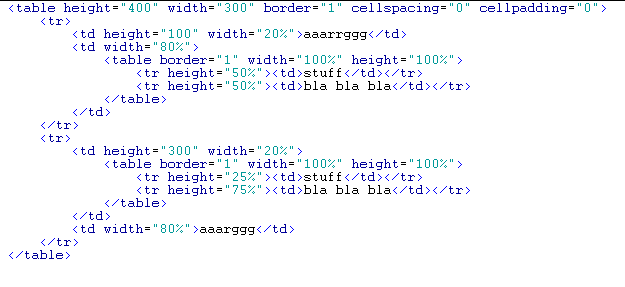
Suppose I want to create an HTML page with a table that looks like this:
code:
+----------+------------------------------------+
|          |                                    |
|          |             Cell 2                 |
|          |                                    |
|  Cell 1  +------------------------------------+
|          |                                    |
|          |             Cell 3                 |
|          |                                    |
+----------+------------------------------------+
|          |                                    |
|  Cell 4  |                                    |
|          |                                    |
+----------+                                    |
|          |                                    |
|          |                                    |
|          |             Cell 6                 |
|          |                                    |
|  Cell 5  |                                    |
|          |                                    |
|          |                                    |
|          |                                    |
|          |                                    |
|          |                                    |
+----------+------------------------------------+
So, in this table, I want cells 1 and 4 to be of fixed dimensions; cells 2 and 3 of fixed height and width - according to the page width; cell 5 of fixed width, and height - according to the page height; and cell 6 to fill the rest of the page.
So, I give the cells I know the dimensions of the appropriate style attributes, and it seems everything should work out very well... Well, cells 1, 2, 3, and 6 do, indeed, behave as I want them to. However, in IE, cell 4 doesn't want to preserve its height! (It works just fine in Netscape and Opera, but knowing that a lot of people that will browse the resultant page will be users of IE, I have to accomodate them.  ) What IE does is, it distributes the height evenly between cells 4 and 5 - both half of cell 6's height... It must have something to do with incorrect interpretation of the rowspan on cell 6, but that doesn't help me much. ) What IE does is, it distributes the height evenly between cells 4 and 5 - both half of cell 6's height... It must have something to do with incorrect interpretation of the rowspan on cell 6, but that doesn't help me much.
Now, if I add a spacer image to cell 5 to make it higher that way, rather than through a style attribute, it works, but that limits how much information I can have in Cell 6... If I put more text there than the height of the spacer image, the problem kicks in again, and IE distributes the left over space evenly between cells 4 and 5...
Sooo, anyone know how to fix that and make cell 4 a fixed height? Help would be greatly appreciated.
|
|
| |
|
|
|
BustaMike
|
 |
You think you're better than me? You've been handling my ass pennies!!!
Nov 1999
time: 21:31
|
|
disregard.. the forums won't display the borders well and they got rid of all my formatting
Last edited by BustaMike on 05-10-2003 at 10:56
|
|
| |
|
|
|
Sn00py
|
 |
From New Zealand
Aug 2001
time: 13:31
|
|
Sometimes you will find many problems with tables such as this, a tiny 1 pixel long image will hold all the tables together nicely.
It's obvious Cell 6 will have the text, if your text is long, cell 5 will stretch downwards, gotta make sure that everything is justified correctly.
Honestly, I dislike Dreamweaver a LOT, it has caused so many uneccessary problems I just got sick of it. I went to Frontpage 2002 and will never look back. I am waiting to get Frontpage 2003. This program IS solid. People will say "But its Microsoft" But but but, well, tell them to shove off, if the program works, it works, simple as that. If it don't, then bugger off. 
|
|
| |
|
|
|
chegitz guevara
|
 |
Ft. Lauderdale, FL Communist Party of Apolyton
Jun 2000
time: 00:31
|
|
quote:
Originally posted by Hueij
Layers?? As in Netscape layers? |
No, not Netcape layers, CSS layers. It also requires a little javascript, since you need to get the layers on the right to line up with the right edge of the left layers.
Download the SnapLayers extension from PVII, and you can have valid CSS layers with the layout you want.
Last edited by chegitz guevara on 06-10-2003 at 04:08
|
|
| |
All times are GMT. The time now is 05:31.
Apolyton Time is 00:31. |
top of page
|
| archivepost |
|
Forum Rules:
You may not post new threads
You may not post replies
You may not post attachments
You may not edit your posts
|
HTML code is ON
vB code is ON
Smilies are ON
[IMG] code is ON
|
|
|
|
|
|






 05-10-2003 10:13


 I'm not that ignorant.


 Attachment:



 The horror! Nooooooooo....


 |
|