Apolyton Archive  |  Preserved copy of the Apolyton Civilization Site and its forums as they stood in September 2005. Read-only; nothing here can be posted to or replied to.  |  Forum index |  About this archive |  The 1998–2001 UBB forums
Today on Apolyton WARDELL INTERVIEW PROMO A.C.S. HISTORY CHAPTER 4 GET CIV4 /w FREE PLUS! A.C.S. PHOTO GALLERY GET A.O.M. V1.1
Apolyton Civilization Forums
main| civ2| civ3| civ4| smac| ctp2| ron| moo3| galciv| galciv2| alt| about|
ApolytonPLUS | register | search | faq | new posts | pm (-/-) | upload | members
hall of fame new! | civgroups | civgroups news | interviews | the column | radio | chat | directory | news | store | PLUS
Apolyton Civilization Forums : Powered by vBulletin version 2.0.3 Apolyton Civilization Forums > Miscellaneous > Archive > Off-Topic-Archive > CPU temperature monitoring
Show a Printable Version | Email This Page to Someone! | Receive updates to this thread | Report this to Apolyton news!

bottom of page
  
Author
Thread    < Last Thread     Next Thread > Post New Thread     Post A Reply
axi is offline axi
Prince
Athens Greece
Sep 1999
time: 07:31
  Old Post 08-10-2003 04:32
Edit/Delete Message Reply w/Quote
#1 Report this post to a moderator
CPU temperature monitoring Support Apolyton, buy Call to Power 2

I recently got a new Pentium4@2.8GHz 800FSB PC with an Albatron 865PE Pro motherboard. I noticed in the BIOS setup that the motherboard is monitoring CPU temperature, voltage and fan speed. This reminded me of an old thread here in Apolyton where people were discussing monitoring these statistics from their desctop, using a windows utility. I tried to find such a utility on the web, but I was surprisingly unable to find anything.

Can somebody spare me the trouble and point out some such utility that is freely available online?

Also, what kind of temperatures should I expect from such a system?

Asher is offline Asher
King
Calgary, Alberta
Nov 1999
time: 22:31
  Old Post 08-10-2003 04:36 Visit Asher's homepage!
Edit/Delete Message Reply w/Quote
#2 Report this post to a moderator
Got spare money?

Motherboard Monitor: http://mbm.livewiredev.com/

Temperatures depend on airflow, case, cooling etc. Anything under 50C is usually good, but 50-60 is acceptable but not recommended. 70C+ is bad.

Zopperoni is offline Zopperoni
Emperor

Dec 2000
time: 06:31
  Old Post 08-10-2003 04:37
Edit/Delete Message Reply w/Quote
#3 Report this post to a moderator
Remove this text

I use AIDA 32.

My P4 2.40c GHz system runs at 30-35º C

Asher is offline Asher
King
Calgary, Alberta
Nov 1999
time: 22:31
  Old Post 08-10-2003 04:46 Visit Asher's homepage!
Edit/Delete Message Reply w/Quote
#4 Report this post to a moderator
Support Apolyton, buy Galactic Civilizations: Deluxe Edition

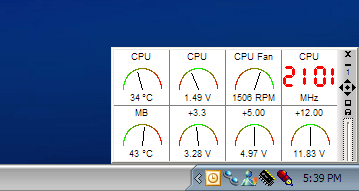
I like MBM because of the Dashboard feature.

(hopefully they fix the images problem soon )

Attachment: dashboard.png
This has been downloaded 54 time(s).

Zopperoni is offline Zopperoni
Emperor

Dec 2000
time: 06:31
  Old Post 08-10-2003 04:48
Edit/Delete Message Reply w/Quote
#5 Report this post to a moderator
Full PM-box? Change here!

I don't need to look at the data all the time, I load AIDA whenever I'm arsed to check the temperature. It doesn't fluctuate greatly anyway, and the CPU fan is always going to be around 2,400 RPM =)

axi is offline axi
Prince
Athens Greece
Sep 1999
time: 07:31
  Old Post 08-10-2003 05:01
Edit/Delete Message Reply w/Quote
#6 Report this post to a moderator
Support Apolyton, pre-order Civilization IV

Thanx alot guys.

Btw, Asher, you have an odd looking taskbar. What OS is it?

Zopperoni is offline Zopperoni
Emperor

Dec 2000
time: 06:31
  Old Post 08-10-2003 05:02
Edit/Delete Message Reply w/Quote
#7 Report this post to a moderator
Support Apolyton, buy Call to Power 2

He has a custom Windows XP theme.

Asher is offline Asher
King
Calgary, Alberta
Nov 1999
time: 22:31
  Old Post 08-10-2003 05:35 Visit Asher's homepage!
Edit/Delete Message Reply w/Quote
#8 Report this post to a moderator
Put an end to popups!

quote:
Originally posted by Zopperoni
I don't need to look at the data all the time, I load AIDA whenever I'm arsed to check the temperature. It doesn't fluctuate greatly anyway, and the CPU fan is always going to be around 2,400 RPM =)

My CPU fan varies from 1,400 to 2,400 automatically depending on temperature

And I agree that you don't need to look at the data all the time, I don't normally have the dashboard open unless I'm overclocking. But I keep the tray icon open because it records temperature statistics (max, min, etc) as well as provides warning should any fans fail.

Dis is offline Dis
Emperor
Las Vegas, Nevada
Feb 2000
time: 21:31
  Old Post 08-10-2003 06:09 Visit Dis's homepage!
Edit/Delete Message Reply w/Quote
#9 Report this post to a moderator
Support Apolyton or Terrorists Win

now how often do fans really fail?

I never check my fans nor my temperature.

And in the summer I keep my house pretty warm to keep cooling costs down. It's usually in the low 80's in my house except in the winter where it will be in the 60's.

alva is offline alva
Emperor
Republic of Flanders
Sep 2001
time: 06:31
  Old Post 08-10-2003 06:19
Edit/Delete Message Reply w/Quote
#10 Report this post to a moderator
Browse Apolyton AD-FREE

Can anyone tell how the voltages are supposed to 'act' btw?

Asher is offline Asher
King
Calgary, Alberta
Nov 1999
time: 22:31
  Old Post 08-10-2003 07:28 Visit Asher's homepage!
Edit/Delete Message Reply w/Quote
#11 Report this post to a moderator
Support Apolyton or Terrorists Win

If it's within 0.25V of its intended voltage it's good.

PLATO is offline PLATO

King
Of the occupied South
Dec 2002
time: 23:31
  Old Post 08-10-2003 07:58
Edit/Delete Message Reply w/Quote
#12 Report this post to a moderator
Support Apolyton buy from Amazon

How does MBM5 work? Just installed it and my dashboard has sensors 1, 2, and 3 reading 32 degrees f. All other readouts are at zero. How do I configure this?

Asher is offline Asher
King
Calgary, Alberta
Nov 1999
time: 22:31
  Old Post 08-10-2003 08:11 Visit Asher's homepage!
Edit/Delete Message Reply w/Quote
#13 Report this post to a moderator
Lose 30 kilos (of popups)

You have to pretty much play with it and determine which sensors are what, then label them.

To edit them, double click on the MBM taskbar entry and click "Temperature" and stuff on the lefthand side.

  < Last Thread     Next Thread > Post New Thread     Post A Reply
All times are GMT. The time now is 05:31.
Apolyton Time is 00:31.
    top of page
Rate This Thread:
archivepost
Forum Jump:
Forum Rules:
You may not post new threads
You may not post replies
You may not post attachments
You may not edit your posts
HTML code is ON
vB code is ON
Smilies are ON
[IMG] code is ON


Contact Us - Apolyton Civilization Site - Support Us!

Building a better Apolyton through better information. Click here and take our poll!
Non-US visitors, click here!

Powered by: vBulletin Version 2.0.3
Copyright ©2000, 2001, Jelsoft Enterprises Limited.

Page generated in 0.0544 seconds (91.20% PHP - 8.80% MySQL) with 31 queries
Page Loading Time:

Support Apolyton: Amazon USA | Amazon UK | Amazon DE | Amazon FR |
Support Apolyton and get FREE PLUS, Buy from Chips&Bits: Galactic Civilizations | Galactic Civilizations: Deluxe Edition | Call to Power 2 | Civilization: The Boardgame | GURPS/ Alpha Centauri | Alpha Centauri | Civilization IV | Civilization III: Complete |


Front Page | Civilization IV | Civilization III | Civilization II | Call to Power II | Alpha Centauri | Master of Orion III
Rise of Nations | Galactic Civilizations | Galactic Civilizations II | Misc
Alt.Civs | Civ I | C:CtP I | About | News | Directory | Apolyton Store | Forums | Chat | Columns | Interviews | Newsletter
Scenario League | CSC | Clash of Civs | Spanish Site | CtP Maps | Cradle of Civ | WesW's Ctp1/2 Site | Civ3 Haven

apolyton.net | apolyton.com | civilization2.net | civilization3.net | civilization4.net | civilizationiv.info | calltopower.net | galciv.net | galciv2.net | moo3.net