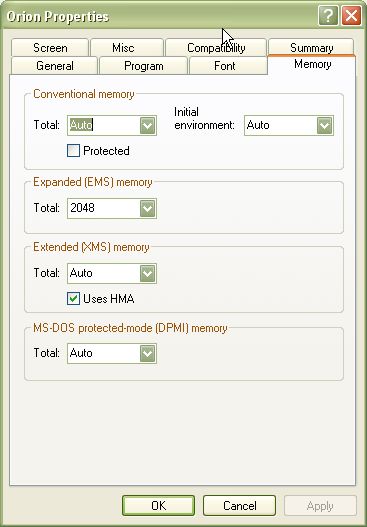
|

|
Factoid
|
|
Hi,
vmxa1's suggestion is hopefully enough to get you running. Even following exactly what vmxa1 says Moo 1 had sound problems on my XP system, and these made Moo 1 crash.
What works for me is DOSBox - DOSBox home page. An alternative fix for sound problems is VDMSound - VDMSound home page. Moo 1 as a last resort can be run with sound completely turned off (run the Moo INSTALL.EXE program), though that is a shame.
Best of luck!
Cheers,
Factoid.
|
|
| |
|
|
|
Jude
|
|
How exactly do you edit autoexec.nt? Is there some program contained in WinXP for this purpose?
Last edited by Jude on 16-08-2004 at 01:22
|
|
| |
|
|
|
pharmer
|
|
I have tried both the config/autoexec.nt and the dosbox solutions with minor results.
The *.nt method got me to a message saying "syntax and/or ? errors in EMM". I have tried every combination of edits to the line that I can think of. (Microsoft's help is not very helpful) Suggestions ?
The DosBox method refused to recognise the pathway to the MOO1 directory. Since I was able to get another game operating with DosBox (XCOM-Enemy Unknown), I know DosBox works (to an extent: XCOM is crashing and has no sound). I might add that I partitioned my disk using Microsoft's program. Would that have an effect on DosBox ?
Thanks for your help, VMXA1 and Factoid.
Harry
|
|
| |
|
|
|
Jude
|
|
OK....I kind of figured I might use Notepad for editing the files, but what changes do I make to them? I all see is techno-gibberish and a lot of rapid eye movement.
I am using DosBox but I'm convinced there has to be a better way. The sound works, but only when I have the CPU cycles down so low that the game is barely responding. Also, it freezes up a LOT, meaning I have to restart my computer all the time and the only solution is to save every turn. Hopefully I'll be able to do better than this.
|
|
| |
|
|
|
vmxa1
|
 |
Oviedo, Fl
Nov 2001
time: 21:35
|
|
REM stands for Remark and acts like a comment, so the line is not executed as a command.
So if you wanted to support a sound card in DOS you would use a SET command to set the appilcation to control it and pass on parameters as you see in this example. A220 and P330 are the address for the sounds.
lh is loadhigh an old DOS command that allows DOS to load aps in high mem. This leaves the 640K of conventional address for the program.
@echo off
REM AUTOEXEC.BAT is not used to initialize the MS-DOS environment.
REM AUTOEXEC.NT is used to initialize the MS-DOS environment unless a
REM different startup file is specified in an application's PIF.
REM Install CD ROM extensions
lh %SystemRoot%\system32\mscdexnt.exe
REM Install network redirector (load before dosx.exe)
lh %SystemRoot%\system32\redir
REM Install DPMI support
lh %SystemRoot%\system32\dosx
REM The following line enables Sound Blaster 2.0 support on NTVDM.
REM The command for setting the BLASTER environment is as follows:
REM SET BLASTER=A220 I5 D1 P330
REM where:
REM A specifies the sound blaster's base I/O port
REM I specifies the interrupt request line
REM D specifies the 8-bit DMA channel
REM P specifies the MPU-401 base I/O port
REM T specifies the type of sound blaster card
REM 1 - Sound Blaster 1.5
REM 2 - Sound Blaster Pro I
REM 3 - Sound Blaster 2.0
REM 4 - Sound Blaster Pro II
REM 6 - SOund Blaster 16/AWE 32/32/64
REM
REM The default value is A220 I5 D1 T3 and P330. If any of the switches is
REM left unspecified, the default value will be used. (NOTE, since all the
REM ports are virtualized, the information provided here does not have to
REM match the real hardware setting.) NTVDM supports Sound Blaster 2.0 only.
REM The T switch must be set to 3, if specified.
SET BLASTER=A220 I5 D1 P330 T3
REM To disable the sound blaster 2.0 support on NTVDM, specify an invalid
REM SB base I/O port address. For example:
REM SET BLASTER=A0
Anyway autoexec is used to override any hardware settign made by CONFIG.SYS or NT in XP.
dos=high, umb
device=%SystemRoot%\system32\himem.sys
files=40
In the config the high, umb are used to tell DOS to use upper memory. Device is locating the path for himem.
Files is a memoiry buffer and for games that need conventional memory I would lower it to 20.
Here is where you would tell DOS to load EMM via EMM386.exe.
This is an emulator for Extended Memory Manager. Really old games like Moo1 use EMM (2k), so DOS would emulate it, but it need to use the app and reserve memory for it.
It has been a lot of years since I use DOS so forgive me for any rust.
|
|
| |
|
|
|
pharmer
|
|
VMXA1:
Know what you mean about rusty skills. Still can't get the EMM syntax errors fixed.
Another alternative to this is to have a DOS boot disk. But, same problem: how to write the appropriate autoexec and config files. Is there a DOS web site for tyros like myself ? CAPTREMF
|
|
| |
|
|
|
pharmer
|
|
Again, thanks for your help.
That error message about syntax was kind of a red herring. A review of Microsoft's knowledge base had me rearranging the placement of the config.nt file. That done, the error message changed. Same issue, but different manner.
To add insult to injury, what Microsoft said I should do was what I had all along. Still doesn't work, and there is no earthly reason. This belongs to the realm of the metaphysical as far as I am concerned. Captramf
|
|
| |
|
|
|
pharmer
|
|
Out of curiosity, where any of those systems multi-processor mainboards ? I am told that the failure of RoN on my system was because of my dual-processor AMD chipset main board (according to the shop that sold it to me). I figure that could be a factor in my difficulties.
Mind you, every time I sit down to fuss with this problem, I learn something new.
|
|
| |
|
|
|
boolybooly
|
|
pharmer do you use an nForce system by any chance ? if so you may find the following thread relevant. [edit - just realised you said AMD chipset but the same principle may apply]
http://apolyton.net/forums/showthre...threadid=107030
nForce2 has abandoned support for EMM and you have to stop the boot process from filling the memory locations with bios driver code for different stuff eg disabling various things like ethernet would get it running for you by freeing up EMM.
quote:
yaay !
it runs nice and fast with sound now
I had to disable USB keyboard support and the mac lan(nVidia) in BIOS integrated peripherals
then I had to instal VDMSound 2.04 and I turned off DPMI in AUTOEXEC.VDMS for luck (actually this is essential)
quote:
REM Install DPMI support
REM lh %SystemRoot%\system32\dosx.exe
then I had to run the Instal.exe and Orion.exe with VDMS using right click on the exe, and then I had to configure for Soundblaster Original with port 220 and IRQ 7 and other thing (1) because it runs slow unless you get the sound card right.
I am still double checking the critical elements, brb.
Edit checked, runs better without any pif fiddles (ie not Win95 compatible mode) |
Last edited by boolybooly on 27-08-2004 at 14:29
|
|
| |
|
| |
All times are GMT. The time now is 05:35.
Apolyton Time is 00:35. |
top of page
|
|
|
Forum Rules:
You may not post new threads
You may not post replies
You may not post attachments
You may not edit your posts
|
HTML code is ON
vB code is ON
Smilies are ON
[IMG] code is ON
|
|
|
|
|
|





 15-08-2004 03:50


 Since I have the old game-challenged product from Microsoft as my OS, I can not play these older versions that required DOS. The solution as I have been able to determine will come in two ways:
 Attachment:
 |
|