|
| |
|

|
Emile
|
|
Netherlands
Nov 2001
time: 08:15
|
|
During the startup, the game already crash at the moment that the Infogrames logo appear. So already before the introduction movie. It looks that just before the publisher logo appear the startup program has replaced the screen resolution from 1024x768 to 640x480. Then everything stops and I can only press the Ctrl Alt Del buttons to wake up my frosen system. My screen resulution is after that indeed replaced from 1024x768 to 640x480. I have a pentium III 450 Mhz system with 192 MB memory. A NVIDIA TNT2 model 64 video card and windows 98SE.
Without a patch to clear this strange bug this Civ3 game is on my system 100% useless.
Greetings from Emile.
Last edited by Emile on 16-11-2001 at 07:07
|
|
| |
|
|
|
Falconius
|
 |
Pleasant Hills, PA
May 2001
time: 00:15
|
|
Some bugs I've noticed: (Please note I have not read all seven pages of this thread, so some of these may be repeats.)
1. Can't use keyboard 'R' for railroad.
2. Many start of turn city report messages are missed. The screen centers on the city, and you hear the bongo sound, but no message displays.
3. Similar to number 2, but for artillery bombardment of cities. Message not always displayed, so results are unknown.
4. Settlers built in a captured city have garbled print where the nationality should be listed (bottom-right screen info). If you right-click the settler, its nationality is listed as "barbarian".
5. This one may not be a bug, but it is a very annoying interface feature. You are told a city is in disorder, but then the focus shifts to something else without giving you the chance to deal with the disorder first.
6. Another annoying interface feature (or possible bug): When you do something with a unit in a stack (such as attack a nearby enemy unit), once the battle is over, the game will take you to an active unit at the other end of the map. Why not stay with the same stack until all those stacked units are done (as in Civ 2)? Fighting a big battle is highly annoying when you have to keep bringing the game back to the area of the battle after each unit fights.
Using an AMD2 / 333 mhz w/ 128 MB Ram
|
|
| |
|
|
|
herwin
|
|
Sunderland, UK
Jan 2001
time: 05:15
|
|
I'm running Win 98 on a Pentium III being simulated by VPC on Mac OS X/ PowerBook G4 500 (equivalent to a 300 MHz Pentium III). This is a vanilla-flavored configuration that has been able to run Baldurs Gate II (including the add-on) and Alien Crossfire. It blows off in ~DF394B.TMP at 167:10025231 with a invalid page fault. I suspect this has something to do with the copy protection, but I suspect this won't be limited to VPC, given that Connectix tries to simulate a vanilla-flavored high-quality chipset.
|
|
| |
|
|
|
Emile
|
|
Netherlands
Nov 2001
time: 08:15
|
|
quote:
Originally posted by Emile
During the startup, the game already crash at the moment that the Infogrames logo appear. So already before the introduction movie. It looks that just before the publisher logo appear the startup program has replaced the screen resolution from 1024x768 to 640x480. Then everything stops and I can only press the Ctrl Alt Del buttons to wake up my frosen system. My screen resulution is after that indeed replaced from 1024x768 to 640x480. I have a pentium III 450 Mhz system with 192 MB memory. A NVIDIA TNT2 model 64 video card and windows 98SE.
Without a patch to clear this strange bug this Civ3 game is on my system 100% useless.
Greetings from Emile. |
A reaction on my own message.
I have the above written problem cleared now. For the may be other people who have the same problems discribed above, this reaction. I have also the game Commando's 2. To play that game without sound corruption, I had to push the slider in DxDiag under the soundtab dialogbox to the leftside to shut down the sound hardware acceleration setting. To make it possible to startup Civilization 3, this slider must be set at the rightside (to open the soundware acceleration setting complete). May be a note to think if you have the same startup problems as I had. It seems that this kind of Direct X setting problems are cleared automatic in the Windows XP version.
Greetings from Emile
|
|
| |
|
|
|
herwin
|
|
Sunderland, UK
Jan 2001
time: 05:15
|
|
I'm running it on a Macintosh PowerBook G4 500 using VPC. Now that I have figured out how to get past the copy protection, it runs beautifully!!!
|
|
| |
|
|
|
pg
|
|
quote:
i am still in disbelief that civ3 won't install but my dilemma. when installing the game it stops at between 69-72% and asks me to 'insert disk 0 that contains the file data3.cab', and since i don't have that file i can't go on with installation and it aborts. it always stops when the file '\sounds\build\ancient\ancgra.wav' is being installed or attemped to being installed. my friend who had the same type of problem said it was a windows error, and not civ3. he told me to reboot and it'd be fine(because that worked for him). so i did that and again the same error this time at 72% again(on a warm boot). next i tried a cold boot, same error pops up but this time at 69%.
now, i am a reasonable person, but never in my 10+ years of pc gaming have i ever had trouble installing a game(i've also never heard of such a thing). never! i'm in shock, heh. one thing i can think of is that this could be a byproduct of firaxis/infograme's attempts to incorporate some anti-cd copying technology which has some defect and is stopping me, someone who actually shelled out hard earned money for their game from installing it. yet, that explanation seems too big a mistake for even firaxis/infogrames to make. anyways...
when i tried to play that problomatic sound off the cd it says "file 'd:\sounds\build\ancient\ancgra.wav' has been corrupted and cannot be opened.". since i really wanted to play civ3, i investigated further and found that certain .wav(all mp3s were fine) files in \sounds\build\ancients\ also gave the same error. every other .wav file i tested from other folders played fine, and most other files(even some from the same folder as the bad ones) were able to be copied off the cd without the corrupted/cannot be opened error.
i also have zero experience working with defective cds so i don't know if these are the signs of a bad cd or not. any advice would ease my mind. basically, i am pretty sure i have a defective cd(and will be getting a new one in a few days), but has anyone else experienced this problem? and if so did a new cd help or not? thanks in advance.
750mhz slot-a athlon
via kx133 mobo
128mb pc133 sdram
31gb eide hard drive
eide cd-rom 56x
gf1 ddr
sblive!
directx 8.1
win98se
20+ free gb(more than enough for a swap file) |
there's my original post on this matter. after posting that someone suggested doing a minimum install which worked flawlessly. i have since gotten a new civ3 cd as i assumed it was a flaulty cd and not copy protection. upon getting the new cd i uninstalled civ3 and tried full installation. guess what? the exact same error! 
now when i was running the game off minimum install before i had no problems playing the music or sound in game(i got into the modern era so all sound/music would have been played), so i can only think that copy protection is ****ing me over. it looks like i might be returning civ3, and might never be buying from infogrames again until such time as this problem is fixed for civ3. civ3 can still play on minimum install, but it's quite annoying having the cd being read and slowing down my game when my system has more than enough space to do a full install. depending on how firaxis/infogrames handles my situation will be how i decide on the matter. 
i know someone will probably say it's my cdrom's fault for being too fast, blah, blah, etc but it's up to infogrames and firaxis to make sure their game works. i cannot understand why they would put such copy protection on civ3 when they know full well(unless they are total idiots), that the warez community will not be stopped by their futile attempts.  
|
|
| |
|
|
|
Sebastian
|
|
Berlin, Germany
Nov 2000
time: 05:15
|
|
quote:
Originally posted by korn469
Sebastian and TreeWolf
corruption is not a bug, it works correctly, firaxis intended it to work that way...however they have said that they will reduce the effect of corruption in the patch |
This _must_ be a bug.
The game isn't playable like this!
Or do you think it's intendet that three of four cities produce only 1 shield instead of 30 ?!
Maybe it's not a bug for a medium world map, but for a 'huge' map, this can't be intended. They just didn't adjust the corruption for the sizes.
So it's a bug.
|
|
| |
|
| |
|
|
|
star mouse
|
 |
of the Barbarians
Aug 2001
time: 16:15
|
|
My unusual system configuration:
Win98SE, 400-500 MHz AMD K6, 256 Mb RAM, virtual memory allocated to its own dedicated 528 Mb partition on D: drive with nothing else stored in that partition and Virtual Memory settings on Custom
When I am reloading CIV3 after I have previously played it for an hour or two (or three or four) and then quit, Windows reports an error that there is no disk space on D: drive (the swap partition). This can also happen when saving a game.
Possible cause: Memory leaks in CIV3.
Workaround: Quit CIV3 and reboot. The system is still stable at this point, but may become unstable really soon due to the lack of virtual memory.
Another bug:
In my first game, there were 3 civs on a continent of their own who NEVER built harbours. As a result, through the whole game I couldn't trade goods with them. Save games are available.
Other bugs I have experienced (nothing new here):
* Science advisor always wants more money
* Inappropriate faces with advisors, particularly with the first message they display
* My galleys have never sunk on oceans if I have the Lighthouse
Last edited by star mouse on 20-11-2001 at 10:53
|
|
| |
|
|
|
Mik Solty
|
|
Moscow
Nov 2001
time: 08:15
|
|
First of all sorry for bad english.
Also sorry if somebody has written already what I do. I've just read official bug list and update to it.
Gameplay bug -
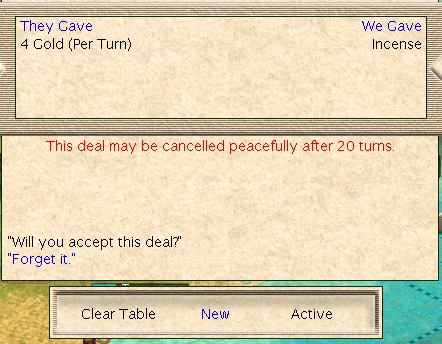
when trading, agree to pay 300 gpld lump sum. But then it turned out that I pay 300/20=15 gold per turn, not lump sum.
Interface issues
Not really bugs but these things need to be improved.
Foreign relations screen.
1. When playing more than 8 countries - only 8 countries are seen. It is very difficult to get general overview switching between screens.
2. Why I cannot see at what year active agreements will be/may be cancelled?
3. To get information on last tech of other nations I need to start to talk to them.
4. Advisor. To get info on other nation's mood to me I need to start to talk to them, because advisor gives clues randomly.
|
|
| |
|
|
|
Jarouik
|
 |
Helsinki, Finland, EU
Dec 2000
time: 07:15
|
|
quote:
Originally posted by star mouse
When I am reloading CIV3 after I have previously played it for an hour or two (or three or four) and then quit, Windows reports an error that there is no disk space on D: drive (the swap partition). This can also happen when saving a game.
Possible cause: Memory leaks in CIV3.
|
I have experienced a similar memory leak problem... my configuration is Win2000, AMD K6-2 400 MHz, 192 Mb RAM. For me the memory leak is, however, usually connected to the music - every once in a while the game starts playing one audio sample in a loop over and over again, during which I can see in the task manager that the game keeps taking more memory.
I can usually repair the problem by turning audio off and then back on in Sound Preferences. Sometimes, however, when I turn the audio off, it can no longer be turned back on and the RAM used by the game still keeps increasing. At this point, quitting the game causes an illegal instruction (doesn't matter much though, as it was being shut down anyway). Luckily, my Win2000 is as stable as ever, it's just that I have to restart Civ3 if this happens. And it gets painfully slow to try quitting Civ3 if it has already managed to take hundreds of megabytes of memory...
And yes, the late game turns on a large map take a minute or two, but this was to be expected on a 400 MHz processor... the memory leak is the only serious bug I've encountered.
|
|
| |
All times are GMT. The time now is 05:15.
Apolyton Time is 00:15. |
top of page
|
|
|
Forum Rules:
You may not post new threads
You may not post replies
You may not post attachments
You may not edit your posts
|
HTML code is ON
vB code is ON
Smilies are ON
[IMG] code is ON
|
|
|
|
|
|





 16-11-2001 06:21


 At least #1 and #4 are covered there.


 Corruption's a killer. And that's with Democracy, courthouses, Forbidden City, police stations, etc. For example; one city, 14 out of 15 shields gone to waste. So I thought i could use the editor. According to the Strategy Guide there should be a place for corruption settings between: Food and Gold, and Wealth on the General Settings tab. Couldn't find it. There is a blank space at the bottom left corner. Is something missing?



 Attachment:




 |
|