|
| |
|

|
adaMada
|
 |
"The Iron" Stadium, Ubergorsk, Apolytonia (C3DG)
Mar 2000
time: 00:16
|
|
Q: Once you've started trading a resource, can you stop the trade or does it go for all time. AI renegotiates after 20 years. I'd like to be able to do that as well. Not sure if this is happening for me behind the scenes or not. Also it would be nice to negotiate the number of years in the agreement as part of the terms of contract. -- Vercingettyrex
A: At the bottom of the diplomacy screen, there is a button labeled "Active", next to a grayed-out button labeled new. By clicking on the Active button, you can see what agreements are active between you and that nation, and renegotiate them (or cancel them) by clicking on an agreement. The number in parentheses next to the agreement is how many more turns it lasts (before it can be canceled peacefully). Note that, as part of this, you can renegotiate peace, which can be very useful if you want something from an enemy who's scared to the death of you  . From the active screen, you can click the "new" button to get back to the original diplomacy screen. . From the active screen, you can click the "new" button to get back to the original diplomacy screen.
|
|
| |
|
|
|
Lord Chambers
|
|
Q. Where can I find a manual online?
A: The manual is available on the CD in PDF format.
Last edited by MarkG on 03-06-2002 at 13:11
|
|
| |
|
|
|
bahoo
|
|
I'll add a question to the FAQ I don't have an answer to, hopefully someone does.
Q. Is there a way to "Wake All" units of a certain type much the way you can upgrade all? Or is there a way to wake them all from the military advisor screen without it automatically closing the screen and focusing you on the unit each time you try to wake one.
(it's very annoying having to individually activate every tank each time you go to war)
|
|
| |
|
|
|
Dominous
|
|
Earth
Oct 2001
time: 05:16
|
|
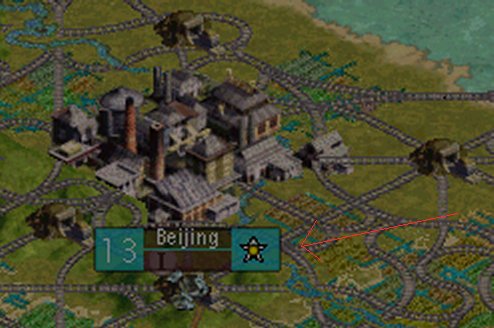
Q. How do you establish an embassy with another civ?
A. After you have discovered writing….right click on your capital city and choose conduct espionage.
read page 199 of the manual (Keystrokes: Game Stuff: Establish an Embassy). Planting a Spy, and Using an Embassy or Spy are also on the page.
Last edited by MarkG on 03-06-2002 at 13:19
|
|
| |
|
|
|
Jaybe

|
 |
Las Vegas, NV USA
Sep 2001
time: 21:16
|
|
Q. Once you've started trading a resource, can you stop the trade or does it go for all time. AI renegotiates after 20 years. I'd like to be able to do that as well. Not sure if this is happening for me behind the scenes or not. Also it would be nice to negotiate the number of years in the agreement as part of the terms of contract.
A. [Discussed elsewhere, but here it is again]. AI may renegotiate after 20 years (especially if they want a better deal). In Negotiations screen, click "Active" on the bottom (near the "New"). If a trade has an number in parentheses by it, that is how much of the 20 years remains. If it doesn't have the number, then renegotiate without diplomatic penalty.
Q. Bombardment by air, land or sea has limited effectiveness. I accept the logic of this because at the end of the day, in history, to take any land you've got to put boots on the ground. Still I'd like bombardment to have more tactical worth than it has just now. Wonder if its possible to give some other options like interdiction, suppression etc which would then help other units ?
A. Bombardment interdiction etc. is only represented by destroying improvements on a square. If you have destroyed an improvement, subsequent bombardment may destroy all remaining improvements (assuming it works similar to pillaging).
Last edited by MarkG on 03-06-2002 at 13:21
|
|
| |
|
|
|
GodSpawn
|
 |
Scotland
Oct 2001
time: 05:16
|
|
Q: How do you place a spy into an embassy?
A1: Ctrl-Shift-E will plant a spy in an embassy.
A2: Double click on the shield icon in the city that built the Intelligence Agency wonder (same position as the Embassy Icon in the Bejiing picture previously). This will also allow you to place spies in other civilizations.
(Thanks to Wal35 and Shankey Burns for the information)
Last edited by GodSpawn on 26-11-2001 at 17:47
|
|
| |
|
|
|
TopHat
|
|
quote:
Originally posted by adaMada
Q: Once you've started trading a resource, can you stop the trade or does it go for all time. AI renegotiates after 20 years. I'd like to be able to do that as well. Not sure if this is happening for me behind the scenes or not. Also it would be nice to negotiate the number of years in the agreement as part of the terms of contract. -- Vercingettyrex
A: At the bottom of the diplomacy screen, there is a button labeled "Active", next to a grayed-out button labeled new. By clicking on the Active button, you can see what agreements are active between you and that nation, and renegotiate them (or cancel them) by clicking on an agreement. The number in parentheses next to the agreement is how many more turns it lasts (before it can be canceled peacefully). Note that, as part of this, you can renegotiate peace, which can be very useful if you want something from an enemy who's scared to the death of you . From the active screen, you can click the "new" button to get back to the original diplomacy screen. |
Do I have the same version as you? (1.07f)
By diplomacy screen, I am infering you mean the Foreign Advisor screen.
My diplomacy screen only has an "active" check box to the right side and it just toggles lines to the pictures of leaders with whom I have routes.
I'd like to have access to this information you describe here.
|
|
| |
|
|
|
Kenjura
|
|
quote:
Originally posted by TopHat
Do I have the same version as you? (1.07f)
By diplomacy screen, I am infering you mean the Foreign Advisor screen.
My diplomacy screen only has an "active" check box to the right side and it just toggles lines to the pictures of leaders with whom I have routes.
I'd like to have access to this information you describe here. |
No. The foreign advisor is the foreign advisor. The diplomacy screen is when you can see another leader's head. You know...the head screen with two boxes for making deals. Below the place that lists options and such, there is another box that says "new" and "active". Usually you are making a "new" deal. "Active" deals are what you already have going on, like trading gems for oil, or trading 9999999999 gold for nothing (heh). If you aren't at war, there will be a "peace treaty". If it's been 20 turns or more, you can re-nogotiate any deal. You can't re-negotiate if it hasn't been 20 turns. You can tell how many turns it's been for each deal, because there is a number in parentheses, such as (18) Gems.
Wraa.
|
|
| |
|
|
|
Wyrmo
|
|
Sweden
Dec 2000
time: 05:16
|
|
Q: Ok, I made an army of three knights, but now I want to replace my units. How do I remove units from my army? I see no "unload"-button available.
A1: Either it can't be done, because noone ever thought that you would remove units from an army to replace them. I mean, EVERYONE has groups of knights riding around with their tanks nowdays... OR, it is some bug assiciated with the fact that silly you never have played without changing this and that in the editor first... such as the research-bug when playing scenarios without default rules.
|
|
| |
|
|
|
Hurry
|
|
quote:
Ok, I made an army of three knights, but now I want to replace my units. How do I remove units from my army? I see no "unload"-button available. |
Wyrno: This is a last-minute gameplay decision. It´s in the Readme file on the CD. I guess they thought armies would be too powerful else. But still, its silly that you can´t upgrade the units in the army.
|
|
| |
|
|
|
Pythagoras
|
 |
Charlottesville VA
Jan 1970
time: 00:16
|
|
Q Can I play say 16 civs on a small sized map? Or for that matter any amount (up to 16) on any size map?
Q If this is posible, how would I go about doing this?
Q How do I play on earth with historic locations?
Last edited by Pythagoras on 28-11-2001 at 09:14
|
|
| |
|
|
|
Canaris
|
|
Q: Why does my espionage missions never ever work, regardless of how much money I spend
|
|
| |
|
|
|
adaMada
|
|
"The Iron" Stadium, Ubergorsk, Apolytonia (C3DG)
Mar 2000
time: 00:16
|
|
Q: Can I play say 16 civs on a small sized map? Or for that matter any amount (up to 16) on any size map? -- Pythagoras
A: Yes, it's possible, but...
Q: If this is possible, how would I go about doing this? -- Pythagoras
A: To the best of my understanding, to play with sixteen civs on anything less than the largest map, you have to make some minor changes in the Editor. Unfortunately, I'm not sure exactly what changes you need to make to do this.
Q: How do I play on earth with historic locations? -- Pythagoras
A: You can't as of now -- hopefully, this will be patched in sooner or later, but until that time...
-- adaMada
|
|
| |
|
|
|
Libertarian
|
|
Q. Is there any way to build an improvement while a city is in revolt or disorder?
A. Yes! You can rush build any improvement in any city — including one that you've just captured with hordes of resistors — with a leader.
(2nd answer by Phoxtrot) There is also the much easier solution : Disband some troops.
It works in all cities, including resisting and unhappy ones.
Disband efficiency is at 25%, way better that the 8:1 wealth production ration (and then you need to pay at least 2 gold for each shield and it doesn't work in resisting/unhappy cities.)
Another way to hurry production is to clear forests (and recreate them), this is however no longer valid in 1.16 as the patych readme say that you can now get the clearing bonus only once per game.
Last edited by MarkG on 03-06-2002 at 13:40
|
|
| |
|
|
|
HalfLotus
|
 |
ATL, shorty.
Sep 2001
time: 00:16
|
|
Q1: Next to my city name, there is the population number. It is sometimes red, sometimes yellow, and sometimes red. What does this mean?
Follow up: Also, there is sometimes a white rectangle surrounding said number. What does IT mean?
Q2: How cool is HalfLotus?
A1: A red pop. number means there is a food shortage, yellow means food balance, and a white number means food surplus for that city.
If there is a white rectangle around the number, then that city's citizen mood is being controlled by your governor. If there is no rectangle, then you are controlling citizen mood. This can be changed in the city governor screen.
A2: Very.
Last edited by HalfLotus on 05-12-2001 at 08:08
|
|
| |
|
|
|
adaMada
|
|
"The Iron" Stadium, Ubergorsk, Apolytonia (C3DG)
Mar 2000
time: 00:16
|
|
Q: How can one get to said city governor screen?
A: While in the city screen, press the 'G' key.
Last edited by MarkG on 03-06-2002 at 13:29
|
|
| |
|
|
|
diegoami
|
|
quote:
Q. How do you establish an embassy with another civ?
|
You can also click on the star sign which is above your capital in the map to open the diplomacy screen.
|
|
| |
|
|
|
diegoami
|
|
Q: How do I create a building queue in a town
A: When choosing an improvement / unit to build, keep the SHIFT key pressed and click on the improvement. It will be added to the building queue.
|
|
| |
All times are GMT. The time now is 05:16.
Apolyton Time is 00:16. |
top of page
|
|
|
Forum Rules:
You may not post new threads
You may not post replies
You may not post attachments
You may not edit your posts
|
HTML code is ON
vB code is ON
Smilies are ON
[IMG] code is ON
|
|
|
|
|
|





 22-11-2001 20:44



 Attachment:


 |
|