|

|
Mattaba
|
|
quote:
Originally posted by vmxa1
PF, I was looking at the early save and I do not see the FP anywhere and it is not available to build, was it disabled or am I just blind. I tried to scroll through all the cities and then I went to the culture advisor and did not see it in any city. Do I need glasses or sleep or what. |
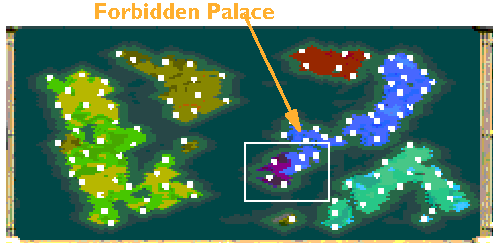
I had that too, I got a great leader and wanted to build the FP in the newly conquered indian town with the GL(dunno its name).
|
|
| |
|
|
|
Mattaba
|
|
Another question: I see that some things have been modded, but some thing don't go right.
Which changes have you made?
I mean when I entered the Middle Ages I received monotheism AND military tradition for free, WTH military tradition?
|
|
| |
|
|
|
planetfall
|
 |
Incoming from CO
Jan 2002
time: 22:23
|
|
quote:
Originally posted by Mattaba
Another question: I see that some things have been modded, but some thing don't go right.
Which changes have you made?
I mean when I entered the Middle Ages I received monotheism AND military tradition for free, WTH military tradition? |
Only 2 edited tech changes: Mil Trad free tech in Ind Age, and Genetics in Modern. I was just experimenting to see what effect it would have to have a free tech in the later Eras.
Undid MT in editor, but won't effect this game.
Editor changes
Oh, note bombers have lethal bombardment but not art type units. Bombers can also see invisible, i.e., subs. Bombers and jets have
slightly increased range. One or two of the naval units has range increased by 1. Can't recall which. Actually think it was carrier so easier to move BS-carrier stacks. To keep the same ratio between DS and carrier, DS increased by one also. Oh, AEGIS also has increased range.
Can't remember if set radar art with range of 3. I was thinking of experimenting with this to see if it would make radar art useful for something other than to add shields to newly conquered city. SNN has more power but still AI and I rarely use them. Stealth fighter may have more power. I thought about it based on some discussion but can't recall if made the change. I usually only have 0-2 stealth fighters/game.
Don't think any prefence changes to: inf, MI, MA, tanks, panzers, marines, or cruise missiles.
-- PF
|
|
| |
|
|
|
Mattaba
|
|
I played from 10 B.C till 710 AD already.
Things are looking better.
I poprushed libraries at the beginning because culture was very low.
I bought all techs except for chivalry.
I'm currently invading India with about 20knights 8 horsemen and 6 swordsmen.
I've taken 2 towns already and got a great leader.
It was a perfect FP city there, but it wasn't available in the build queue.
Planetfall could you tell me what are the requirements for the FP in this game? some strategic resource?
Anyway things aren't looking so bad in my game.
|
|
| |
|
|
|
Mattaba
|
|
Stupid question: how do you make screenshots?
Haven't done it before so...
|
|
| |
|
|
|
planetfall
|
|
Incoming from CO
Jan 2002
time: 22:23
|
|
quote:
Originally posted by Mattaba
Stupid question: how do you make screenshots?
Haven't done it before so... |
Not stupid question. I will assume you are using Windows version and not Apple.
1. Print Screen
This gets the image in buffer.
2. Switch to windows via Menu Key and start paint
This part is a bit tricky. Civ3 disables the standard switching key, Alt-Tab, etc., but if you have an enhanced keyboard {may cost $15}, there is a MS windows icon key by/at the left alt key. The MS windows icon will bring up trask bar. Start|Programs|accessories|Paint
3. Paste into paint
Control-v, or Menu|Edit|paste, and answer yes when it asks if you want to increase the window size.
4. From paint save as gif type file
You could also save as jpg but gif seems to have a better quality.
5. Edit the file to the correct size for the forum
For the forum the file must:
A-- not be too big. Limit is 500 000 bytes
and
B-- image size must be no greater than 600x600.
For editing, either use your favorite graphic imaging tool. My practice is to import into Freelance Graphics as the gif import filter works pretty well. I think powerpoint will also import. Make sure you embed the image in your presentation. Then instead of saving as Freelance/powerpoint file type export/save as gif file. Naturally before you do this you can add arrows and text boxes to explain your image.
I would strongly urge you browse the web and get irfanview as it will allow you to 1) easily crop images and 2) know what size the image is in pixels. I use unix so I use xv instead of irfanview.
6. When you post, browse your file system and select the file before your post.
NB: if want to preview your post, don't attach file until you are finished with edits.
7. Questions,
post them.
Good luck, have fun.
-- PF
|
|
| |
|
|
|
vmxa1
|
 |
Oviedo, Fl
Nov 2001
time: 21:23
|
|
Well, if I don't survive the first day, I do not need to worry about the 7th day. I do not have many flips, so I would not be too concerned. It can happen of course, but I have grab metros and held on. If you can bombard them down and then garrison large numbers, starve and put all on entertainers. I do not recall, but the cities in zone 2 were not huge (over 20) were they? If you are really worried about flips, raze the city and use the settlers to make a new one, may be the best play as you can now buy the upgrades, otherwise you have to wait for the resistance to end.
|
|
| |
|
|
|
Mattaba
|
|
quote:
Originally posted by planetfall
Not stupid question. I will assume you are using Windows version and not Apple.
1. Print Screen
This gets the image in buffer.
2. Switch to windows via Menu Key and start paint
This part is a bit tricky. Civ3 disables the standard switching key, Alt-Tab, etc., but if you have an enhanced keyboard {may cost $15}, there is a MS windows icon key by/at the left alt key. The MS windows icon will bring up trask bar. Start|Programs|accessories|Paint
3. Paste into paint
Control-v, or Menu|Edit|paste, and answer yes when it asks if you want to increase the window size.
4. From paint save as gif type file
You could also save as jpg but gif seems to have a better quality.
5. Edit the file to the correct size for the forum
For the forum the file must:
A-- not be too big. Limit is 500 000 bytes
and
B-- image size must be no greater than 600x600.
For editing, either use your favorite graphic imaging tool. My practice is to import into Freelance Graphics as the gif import filter works pretty well. I think powerpoint will also import. Make sure you embed the image in your presentation. Then instead of saving as Freelance/powerpoint file type export/save as gif file. Naturally before you do this you can add arrows and text boxes to explain your image.
I would strongly urge you browse the web and get irfanview as it will allow you to 1) easily crop images and 2) know what size the image is in pixels. I use unix so I use xv instead of irfanview.
6. When you post, browse your file system and select the file before your post.
NB: if want to preview your post, don't attach file until you are finished with edits.
7. Questions,
post them.
Good luck, have fun.
-- PF |
Thanks
I can finally build the FP.
I'm gonna invade Rome and hope to get a great leader.
I have discovered the other 3 civs and they are ahead 2 or 3 techs, so I don't know if I can get ToE.
With a well timed prebuild, I should be able to get the UN and win.
|
|
| |
All times are GMT. The time now is 05:23.
Apolyton Time is 00:23. |
top of page
|
| archivepost |
|
Forum Rules:
You may not post new threads
You may not post replies
You may not post attachments
You may not edit your posts
|
HTML code is ON
vB code is ON
Smilies are ON
[IMG] code is ON
|
|
|
|
|
|






 23-10-2002 01:25


 .
. Attachment:
 , I mean that's really early for Monarch.
 |
|