 |

|
Tingkai
|
|
To find the Northwest Passage
Aug 2001
time: 13:28
|
|
I want to upgrade my computer by getting a new video card. The one I have is 16mb, and that's all I know about it.
So what should I get? 32mb, 64mb, 128mb?
Can someone explain in layman's terms the terminology of video cards? What's all this stuff about non-pro and PCB?
Will I need to upgrade my processor (I've got a 550 AMD)?
I want something that will last a few years, but I don't want to spend a lot of money.
Thanks in advance to anyone who can help me.
|
|
| |
|
|
|
Cruddy
|
|
I too have a 550 MHz AMD, and solider on with a TNT2.
It would be helpful if you gave a bit more info.
1) Your top budget.
2) What monitor size you are using - is it tube or flatscreen?
3) What games you like to play, and how long before you have money to upgrade again (1 year? 3 years?)
|
|
| |
|
|
|
Lord Merciless
|
|
Processor:
Celeron 2GHz for $80,
Athlon 2GHz for $90.
Graphics Card:
Nvidia Geforce 4 MX 64MB for $70-$80
|
|
| |
|
|
|
Cruddy
|
|
OK, some basics before Asher and Skanky arrive to give you some buying tips;
1) The CHIPSET of the card is the most relative. So I am using an NVIDIA TNT chipset. NVIDIA went over to the GEFORCE series, and latest one I have seen is the GEFORCE4 TI5800. No doubt there's a better one now. ATI, a competitor to NVIDIA, make the Radeon chipset, again available in different model numbers.
2) The memory TYPE is more important than the size. DDR memory is the preferred type, as it has a much faster access than the SD-RAM type.
3) Cards are made by many manufacturers (Creative Labs, PalitDaytona, Sparkle amonst many others) but it's the chipset on the card that usually matters.
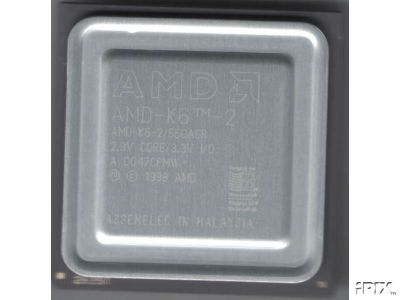
4) In order to upgrade that processor, you will need a new motherboard, as the 550 AMD is the fastest that will fit into a socket 7. Your choices are;
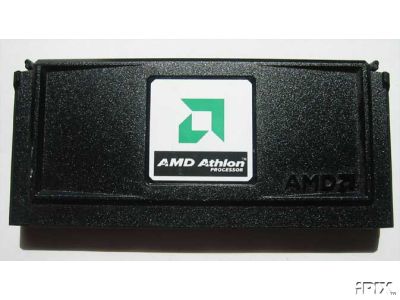
1) A slot 1 motherboard (not recommended - P2s and older P3s, you won't see a huge difference).
2) A Socket A motherboard (for Duron/Athlon AMDs. Cheapest way to a faster processor).
3) A socket 370 motherboard (for older Celerons - cheap but not as fast as AMD).
4) A more recent Intel slot for Pentium 3/4s. Most expensive but give the fastest clock rates.
As I am on a budget, I have gone for option 2. Got a cheap motherboard in the January sales and am saving my pennies for a cheap Athlon 1-1.4 GHz.
HOWEVER, you will also need some more memory to make the faster processors work more effectively. AMD use DDR (in 200, 266, 333 and now 400MHz, compared to SD-RAMs 133 MHz top limit) and some P4s use it too. Many P4s use an Intel standard called RIMMs which IIRC have been discontinued now, because DDR is cheaper and more effective.
Last edited by Cruddy on 05-06-2003 at 12:48
|
|
| |
|
|
|
Lord Merciless
|
|
There is no point in buying the latest CPUs and GPUs. Most of my games and applications still run smoothly on my ancient 500MHz Pentium 3 with Geforce 2 MX 32MB. I doubt Tingkai is a hardcore FPS fan, so he should be perfectly ok with Celeron/Athlon 2GHz and Geforce 4 MX.
|
|
| |
|
|
|
Cruddy
|
|
OOps., nearly forgot - their are 2 standard connectors for GFX cards, AGP and PCI. AGP is the preferred option (faster) and comes in X1, X2, X4 and latest X8. PCI is slower but many motherboards don't have an AGP slot, so those boards can only be upraded with a PCI graphics card.
Just one point Lord Merciless - a P3 500MHz has got a little more power than an AMDK6-2 550MHz. It's got a lot more than my PC Chips motherboard can supply (To get top speed I have to run at 64Mb system RAM - now that is bad news).
You can understand why I don't want to use this motherboard or processor any longer than I have to.
|
|
| |
|
|
|
Tingkai
|
|
To find the Northwest Passage
Aug 2001
time: 13:28
|
|
quote:
Originally posted by Cruddy
I too have a 550 MHz AMD, and solider on with a TNT2.
It would be helpful if you gave a bit more info.
1) Your top budget.
2) What monitor size you are using - is it tube or flatscreen?
3) What games you like to play, and how long before you have money to upgrade again (1 year? 3 years?) |
I think I have a TNT2.
I don't play FPS, but would like the option. I just noticed that some of the new games are recommending having a 32 mb card.
Thanks for the info about AGP and PCI. I'll have to figure out what I have.
As for price, I glanced at some cards yesterday and the price seems to range from HK$350 to +HK$1,000 (about US$45-$125). So something under US$75.
But the link UR posted talks about prices of more than US$300! Is that how much I would have to spend?
|
|
| |
|
|
|
Cruddy
|
|
quote:
Originally posted by Tingkai
I think I have a TNT2.
I don't play FPS, but would like the option. I just noticed that some of the new games are recommending having a 32 mb card.
Thanks for the info about AGP and PCI. I'll have to figure out what I have.
|
If you select "Properties" from "My Computer" you can see what is "under the bonnet" without undoing a single screw. Plus, it lists PCI or AGP (although beware - onboard graphics sometimes appears as either when it fact it is neither!).
So are you SURE you have a card? Check the back of the box - if the monitor lead is connected to a slot (one of the vertical metal strips) then yes you do, and the above method will tell you what you've got. Some motherboards have TNT2 built into them (onboard graphics).
quote:
Originally posted by Tingkai
As for price, I glanced at some cards yesterday and the price seems to range from HK$350 to +HK$1,000 (about US$45-$125). So something under US$75.
But the link UR posted talks about prices of more than US$300! Is that how much I would have to spend? |
Lord Merciless recommendation is about right - the MX versions of the GeForce 4 aren't as good as the TI or VX but are still MILES better than a TNT2.
If you're going 2nd hand - well, you might get lucky and get a Radeon 9500 for that.
Yes, you can spend hundreds of dollars on the latest cards - but as most people don't have them at any point in time, software people are wary of releasing games that need them. Luxury items, see what I mean?
|
|
| |
|
|
|
Cruddy
|
|
Oops - I doubt a Radeon 9000 or better will work with an AMD 550.
Typically, if you have an AGP port it's going to be X1 (because the AMD550 only supports 100MHz SD-RAM and AGP X2 needs 133MHz SD-RAM).
Correct me if I'm wrong here people - but a PCI graphics card will work with just about all systems, but you are going to need a motherboard and processor upgrade for sure to use an AGP X2 or later AGP card, such as the AGP GeForce 3 or 4 or the Radeon 9000s or later.
|
|
| |
|
|
|
Bereta_Eder
|
|
AH nice info useful to me too thanx.
i got my hands on a 700 mhz processor and mothercard and im thinking maybe do an upgrade from my 430 mhz. i dont use the PC for games etc so my needs are verylimited.
yet with a new video crad of just 60 euros i think i can do a minor upgrade why not.
i;m thinking of this too Nvidia Geforce 4 MX 64MB for $70-$80
and the 128mb one isjust 10 euros more expensive so maybe
although i dont know if a 128 will go lost with just a 770 mhz processor?
|
|
| |
|
|
|
Bereta_Eder
|
|
will a 64 mb card go wasted on a 700 mhz procesor?
|
|
| |
|
|
|
Tingkai
|
|
To find the Northwest Passage
Aug 2001
time: 13:28
|
|
quote:
Originally posted by Asher
Don't upgrade your video card unless your processor is 1GHz or faster. Your bottleneck will be your system, not the video card.
Don't buy a GeForce 4 MX -- it's a DirectX 7 card.
A Radeon 9000 is a DirectX 8 card.
Radeon 9500/9700/9800 and GeForce FX cards are all DirectX 9 cards.
DirectX 9 are by far the most powerful, and flexible, and support DirectX 9 features in hardware that you otherwise do without or are emulated with great performance loss on older cards.
Most games these days are DX8, but tomorrow's (and DOOMIII's) will be DX9-level games... |
I was hoping you would provide some advice.
So here's what I have:
A tnt2 model 64, 16mb, bus type pci
AMD K-7 500mhz
256 ram
windows 98
So is there any point in a simple upgrade to a 32mb video card? Can I upgrade to a 64 with PCI? Or should I be looking at a complete upgrade?
The other thing is: Is this the time to do a big upgrade. The computer I have is about three or four years old.
The other thing is I'm not using this for major graphics games. I just want something middle of the road.
|
|
| |
|
|
|
Asher
|
 |
Calgary, Alberta
Nov 1999
time: 22:28
|
|
quote:
Originally posted by Tingkai
I was hoping you would provide some advice.
So here's what I have:
A tnt2 model 64, 16mb, bus type pci
AMD K-7 500mhz
256 ram
windows 98
So is there any point in a simple upgrade to a 32mb video card? Can I upgrade to a 64 with PCI? Or should I be looking at a complete upgrade?
The other thing is: Is this the time to do a big upgrade. The computer I have is about three or four years old.
The other thing is I'm not using this for major graphics games. I just want something middle of the road. |
I would definitely do a big upgrade. You might be able to find a PCI card with 64MB of RAM, but it'd be useless. PCI's memory bandwidth is rather pathetic, AGP has way more. What that means, in layman's terms, is PCI is like sipping a 2L bottle of pop with a tiny straw, and AGP is like chugging it. PCI doesn't cut it for graphics, not even close, which is why AGP exists. Even AGP is getting too slow and is being replaced next year, and it's 8x faster than PCI.
It's actually fairly cheap to upgrade your computer fully. Look for shops near you like www.memoryexpress.com, you can deck out a very nice computer for about $800CDN.
For instance, here's an example for how cheap it can be (CDN $):

And I get a 10% discount on top of all their prices due to having a CS undergrad society membership...
|
|
| |
|
| |
|
|
|
Cruddy
|
|
quote:
Originally posted by Tingkai
I was hoping you would provide some advice.
So here's what I have:
A tnt2 model 64, 16mb, bus type pci
AMD K-7 500mhz
256 ram
windows 98
So is there any point in a simple upgrade to a 32mb video card? Can I upgrade to a 64 with PCI? Or should I be looking at a complete upgrade?
The other thing is: Is this the time to do a big upgrade. The computer I have is about three or four years old.
The other thing is I'm not using this for major graphics games. I just want something middle of the road. |
OK TingKai, here are some options - as I'm in the same situation as you, I've got a slightly more realistic perspective.
1) That GeForce 4 MX card, in PCI format, will at least let you play some FPS like Max Payne, Red Faction and similar, because there is enough memory on the card. These are all a couple of years old though.
2) Have a look inside to see if you have an AGP slot. This is a brown slot, next to the white PCI slots, and I've yet to see a motherboard with 2 of them. If you have an AGP slot (it will be AGP X1) then fitting a GeForce 2 Max or Ultra should give a little bit better performance than a PCI card.
Above that, you are looking at changing the motherboard, processor, and that 256Mb of memory. A complete rebuild. First, do you have an AT case? The easiest way to check is unplug the keyboard and look at the connector - if it's a full size DIN (about 1 cm = approximately half inch) in diameter, then yes, you have an AT case. If it's a mini DIN - similar to SVHS connectors on TVs/videos/game consoles (about half centimetre in diamter = approximately quarter inch) then it's an ATX case, and all recent motherboards will fit it.
A) Your best option for an AT case would be a motherboard upgrade to a system wit 133MHz RAM is the next step. A Pentium 3 at 700 MHz to 1.3 GHz (or it's cheaper Celeron equivalent) will let you use an AGP X2 card - MOST X4 cards will also work in X2. The PCI bus only works at 33MHz, even AGP X1 works at 66MHz and AGP X2 is 133MHz - so you will still get a huge advantage in gaming power. It's also the cheaper upgrade route, because you will be buying 2nd hand.
B) If you have an ATX case, then you can still go P3/Celeron, but AMD Duron/Athlon gives you a better top limit. You could start off with say a 1GHz Duron (and 200MHz DDR memory) and increase it later. However, be careful which motherborad you go for - some are limited to 200MHz DDR memory, many are limited to 266MHz DDR, some will go to 333 or 400 MHz DDR.
C) Of course, you could go P4. This will give you the highest system clock rate, the best throughput, and leave the biggest hole in your wallet. As it is not my upgrade path I won't comment further.
Hope this helps.
|
|
| |
|
|
|
faded glory
|
 |
This trash talking 2 bit dope dealer is about to learn respect for the law
Jan 2001
time: 05:28
|
|
"I've got a 550 AMD"
Since Socket A goes all the way up to the barton core (although actual support is stingy)
"Can someone explain in layman's terms the terminology of video cards? What's all this stuff about non-pro and PCB?"
Pay attention to Clock Speeds, RAMDAC, Make sure it has FSAA, AA 4x, etc. Depending on your board get an AGP Pro, unless your board is older, then just get a version PCI busmaster mode. Slower (66mhz, I beleive)but still good. You can get TnT2, Radeon 9000 or Geforce2 PCI for cheap.
Tinkgai, if your buying a newer board (Nforce2 or KT466,etc cs) you should get up to the high end XP 2400-2600. If the board sucks, just get an XP 1800 or something T-bred B core (no palomino unless u want a fire).
If your not using windows 98, You should look into a Geforce fX 5200 Or Rad 9500 light-Version, but Nvidia v. ATI thing is really your decison.
|
|
| |
|
| |
All times are GMT. The time now is 05:28.
Apolyton Time is 00:28. |
top of page
|
| archivepost |
|
Forum Rules:
You may not post new threads
You may not post replies
You may not post attachments
You may not edit your posts
|
HTML code is ON
vB code is ON
Smilies are ON
[IMG] code is ON
|
|
|
|
|
|





 05-06-2003 12:21





 ... if not that Radeon 9600 pro should be a decent bet but you have to overclock the card to get most out of it... (around 20-25% more) which is than at 9500pro level or a bit better...

 |
|