|
| |
|

|
Mercator
|
 |
Sorekara no Nanimo
Jan 1970
time: 06:28
|
|
Mr. Oobir and Boco gave me a little stroke of genius, and I figured out a way to hide the health bar!
I have to be a bit careful, because I haven't tested it yet...
PRELIMINARY 1: In the sprite files, the unit images don't need to be 64x64 pixels. In fact they can be just about any size you want.
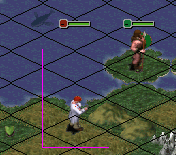
PRELIMINARY 2: The sprite image is always aligned to the left and bottom sides of a square (in the attachment:against the pink lines for the Engineer). So if you make the sprite image any larger it'll expand to the right and up.
PRELIMINARY 3: The health bar is always positioned centred at the top of the unit icon.
In the attachment I changed the height of the Engineer (in the Static.spr) to 64x128 (twice the height). And as you can see, the health bar is located twice as high (compared to the normal height of the Warrior).
I had hoped this would be high enough, so it wouldn't be painted, but alas! But then I started thinking... If you can make it twice as high, why not make it 1000 times higher? That way the health bar will fall off the top edge of the entire map!
Moreover, the .spr files are encoded in such a way that leading empty lines don't make any difference at all in filesize. The only thing that changes are a few numbers that say how many leading empty lines there are!
There is some (minor) bad news though:
(1) This method won't work in the units.bmp. But then it DOES work for the static.spr, and you can edit that fairly easily with CivSprite.
(2) Since you can so far only use CivSprite, each unit needs to have 5 images (for 5 different angles). You can simply use the same image 5 times, but the static.spr file is slightly bigger than the units.bmp (and much bigger when both are zipped)... But if you use the same image for all 5 angles there won't be much difference even when you zip them up (the zipped up sprite file might even be smaller).
(3) For sprite files the height might not matter, but for bitmaps it certainly does! Since you need to use CivSprite you have to make the images as bitmaps first.
The image should probably be some 10,000 pixels high, which means a filesize of almost 2MB per bitmap!
Then again, people have gigabytes of harddrive space anyway, and you can get rid of the bitmaps once you created the sprite file...
In other words, there's nothing to worry about. Get busy! 
 Attachment: unit.gif Attachment: unit.gif
This has been downloaded 233 time(s).
|
|
| |
|
| |
|
| |
|
| |
|
|
|
Mercator
|
|
Sorekara no Nanimo
Jan 1970
time: 06:28
|
|
Ahem... I've now actually tested it, and it doesn't quite work how I hoped it would...
While I thought increasing the height into the thousands would make the health bar disappear, it also makes the unit icon disappear. 
With lesser heights (of some 700 pixels extra) the health bar can be seen in more zoomed-out levels, a few dozen squares up. And when zooming in more, again, the unit icon disappears. In standard zoom though (and one or two zoom levels either way) the unit is visible and the shield is hidden from view, off the screen (invisible enough for me  ). You won't see the shield when you scroll up either, because then the unit would disappear off-screen and it (along with its shield) won't be drawn in the first place. ). You won't see the shield when you scroll up either, because then the unit would disappear off-screen and it (along with its shield) won't be drawn in the first place.
I've made a little new application, which can automatically generate a static.spr from an existing units.bmp. So far, this can NOT use the masking, NOR the multiple facing directions, and I've used a fixed shield "distance" (you can select which units should have a hidden health bar). And more importantly, this file CANNOT be edited by CivSprite. The file is considerably smaller than a regular units.bmp though.
Is that good enough for you? Or would you rather have an editable shield distance, and all facing directions etc?
In any case, you can already use CivSprite to do everything. But my new utility would save you the trouble of adding extra pixels to the top by hand, and copying images for multiple facing directions. In fact, it actually uses 1 image per unit rather than 5 times the same image, which is why CivSprite can't load the created file (and also why the file is much smaller than a units bitmap)...
quote:
Using Static.spr has the added advantage that you can make sure flags/shields are in the correct orientation when images are mirrored. |
Not really, since the static sprites also use mirroring, so all the left-facing units would also have mirrored flags.
quote:
Use the unit's mask for Civ-coloring, not the unit key. This gets rid of a chunk of the unit key and avoids the grayed colors that ToT insists on using in the key. Do I understand this right? |
Except that the "action letter" also needs a place. Do I understand you right? 
quote:
What happens if the mask and image are different heights? If that's allowed, it might open things up even more. |
Not possible. In sprite files they're actually just the same image. Basically, every pixel has four properties (R, G, B and civ-colour), rather than the usual three (R, G, B).
I had to use two different images because I don't know how else to do it (except perhaps using image layers, but that's only possible in more complicated and less widely supported file formats).
|
|
| |
|
|
|
Boco
|
 |
who was once King for a week.
Jan 2001
time: 00:28
|
|
Forget it, I'm going to look for another leg!
 Jumped to a few wrong conclusions. I didn't look at Tech's image closely enough to see that mirroring still occurs with Static.spr. Jumped to a few wrong conclusions. I didn't look at Tech's image closely enough to see that mirroring still occurs with Static.spr.
quote:
Except that the "action letter" also needs a place. Do I understand you right? |
Think so. I'm aiming to edit my unit key so that it only contains the action letter background and the health bar surrounded by a 'Mercator meter'. Remember ToT represents anything that's 255,0,255 in the unit key area as a modified civ color. It looks like the civ color is blended with a 64,64,64 mask. Ugh!
So, it looks like I can use masks in Static.spr to introduce a civ color emblem somewhere in the unit image (a kinda Civ2 FW retro feature). Is this right? If a mask pixel of a unit sprite is white and the corresponding image pixel is 255,0,255, then ToT will show the pixel as the unmodified civ color.
quote:
I've made a little new application, which can automatically generate a static.spr from an existing units.bmp. So far, this can NOT use the masking, NOR the multiple facing directions, and I've used a fixed shield "distance" (you can select which units should have a hidden health bar). And more importantly, this file CANNOT be edited by CivSprite. The file is considerably smaller than a regular units.bmp though |
Uh-Oh! That dumb feeling is coming back.  How do you hide the health bar? How do you hide the health bar?
The utility sounds great, except for the lack of masking. I think I can live with a fixed shield distance, especially if I can hide the health bar on only 3 units. I seriously doubt I'll be using multiple angles for any of my units.
|
|
| |
|
|
|
Mercator
|
|
Sorekara no Nanimo
Jan 1970
time: 06:28
|
|
quote:
Originally posted by Boco
Forget it, I'm going to look for another leg! |

quote:
Uh-Oh! That dumb feeling is coming back. How do you hide the health bar? |
Um... that's what this thread is about (health bar = unit key = shield), changing the height of a unit to something high (640 seems to do nicely) will keep it out of view.
My utility would simply allow you to tick checkboxes for which units you want to have an obscured unit key.
quote:
The utility sounds great, except for the lack of masking. |
I guess I could add the possibility to use a second "mask bitmap". One that would look exactly like the units.bmp, except that the unit graphics would be black and white (just like the mask images for CivSprite).
quote:
I think I can live with a fixed shield distance, especially if I can hide the health bar on only 3 units. |
Yes, I thought so... In principle it's a nice idea to be able to place it at any height. But you can pretty much only move it up (and to the right), and that really isn't good for anything (except move it up so far it disappears).
quote:
I seriously doubt I'll be using multiple angles for any of my units. |
I thought so too... It would be lovely, but most of us aren't even good enough to create a decent graphic for one view. And if someone does need more angles, CivSprite does the job just fine...
The main advantage of this new utility would be (1) automating the height adjustment, (2) allowing you to work with one bitmap, rather than 1 for each unit, and (3) reducing the size of the static.spr.
3 is irrelevant if you need more angles anyway, and 2 is mostly just a matter of principle... The biggest objection to 1 was the file size of the bitmap (point 3 in my inital post), but that is much less the case now, since the height isn't in the thousands (some 2MB), but in the hundreds (max 150kB).
|
|
| |
|
|
|
Mercator
|
|
Sorekara no Nanimo
Jan 1970
time: 06:28
|
|
How about this...
Select a units bitmap... Only 24-bit bitmaps work, so the original 16-bit bitmaps won't work. Opening and resaving those with your favourite image editor will probably convert them to 24-bit.
Anyway...
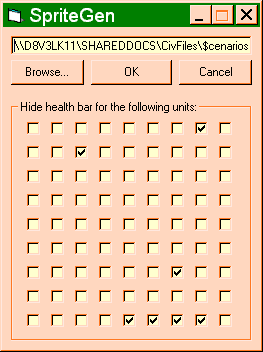
(1) select a units bitmap (type in the path or use the browse button),
(2) Check the checkboxes (the 9 by 9 "matrix" corresponds with the unit bitmap order),
(3) click OK and a file called static.spr will be created in the same directory as the unit bitmap you entered (if one already existed a backup will be created). It'll take a while, but a pop-up message will appear when it's done.
(4) exit by clicking "Cancel".
By the way, with this utility you can't use masks, you have only one image per unit and the resulting sprite file can't be edited by CivSprite.
To hide the unit key, the number of empty lines at the top will be increased to 640.
EDIT: new SpriteGen version.
EDIT2: newer version again... But this time I only changed the readme. I added information about transparency.
BTW, SpriteGen is also available at my utility site:
http://www.civgaming.net/mercator/mapedit
 Attachment: spritegen.zip Attachment: spritegen.zip
This has been downloaded 1 time(s).
Last edited by Mercator on 21-09-2003 at 20:07
|
|
| |
|
| |
|
| |
|
|
|
Mercator
|
|
Sorekara no Nanimo
Jan 1970
time: 06:28
|
|
quote:
Originally posted by Boco
Hmm...Time to show more ignorance. I'm assuming that the SpriteGenerated Static.spr (SGSS) is fine. I'll test later by putting the scifi static.spr in my scenario test directory. |
Isn't it better to test it by putting your SGSS into the Original directory and see if the original game uses it properly?
quote:
If the SGSS is okay, then something with ToT is interfering. In my simple mind, this bulldogged insistence to use the \original\units.bmp could arise from (1) something embedded in the SCN file, (2) a ToT config file somewhere, or (3) particular spr/bmp files present/missing in specific directories. I'll send you the link, and perhaps you could give me an idiots guide to making El Aurens use Static.spr. |
I think (1) must be the case, and possibly (3). I don't think ToT really has any config files... And yes, please send a link (I don't think my Hotmail account can handle any more large attachments... I have to rearrange/download some).
quote:
If the SGSS is not okay, then I'll experiment a little later with CivSprite. I'd like to experiment with icons that are 10% higher than the standard ones anyway, as well as placing masks in locations just above the unit key (e.g. in the blue region of this icon). |
You have to be careful with the unit key graphic, though... I just remembered another use. It gets a blue/green border when a unit can transport/build a transporter... Do you know how that is affected when the entire key is made invisible? That's only an issue in games with multiple maps, though.
|
|
| |
All times are GMT. The time now is 05:28.
Apolyton Time is 00:28. |
top of page
|
|
|
Forum Rules:
You may not post new threads
You may not post replies
You may not post attachments
You may not edit your posts
|
HTML code is ON
vB code is ON
Smilies are ON
[IMG] code is ON
|
|
|
|
|
|






 11-06-2003 01:41





 , but at least it doesn't obliterate its neighbor above. I'll experiment with this one.
 Attachment:
 (Thanks to the Scouse Gits for the smilie)


 |
|