|
| |
|
| |
|
| |
|

|
Catfish
|
|
Wollongong, Australia
Aug 2000
time: 14:28
|
|
Sorry to interrupt all the backslapping. I've tried out SpriteGen and it seems to work as intended. However, I've got three problems: I've tried out SpriteGen and it seems to work as intended. However, I've got three problems:
1. The purple background often found in unit files is visible in the ToT units menu, defence minister and city screens for created sprites. You can, however, change the background to all pink prior to running SpriteGen – this is more a nuisance, I guess. I don't want to accidentally wipe people's unit signatures in the original bmp, either. If you can’t change this, then at least give it a mention in the readme for tards like me.
2. I’ve got units from the units.bmp file in the build menu and units civilopedia. Therefore, if I delete the scenario units.bmp file, these are then replaced by the defaults from the Original directory.
3. The third point is not directly related to SpriteGen, but is a consequence of its use. I have some scenarios, converted from FW/MGE using Angelo Scotto's CivConverter utility, where the SPR file override parameter is set to 1. It's embedded at the end of the .scn file. Does anyone know precisely where, or do I have to search myself?  Unfortunately I think I already know the answer to this one. Unfortunately I think I already know the answer to this one.
|
|
| |
|
|
|
Catfish
|
|
Wollongong, Australia
Aug 2000
time: 14:28
|
|
Nearly forgot. Ignore question 3. I have my answer. Look for the scenario name in either the .scn or .sav file. The byte immediately preceding the name contains this flag. If the byte is set to 01, the SPR override is set to 0. If the byte value is 03, SPR override is 1.
|
|
| |
|
|
|
Catfish
|
|
Wollongong, Australia
Aug 2000
time: 14:28
|
|
I just converted Favoured Flight's ROTK scenario to ToT - it uses units as mountains, which looks terrible with the health bar. Now it looks great.
During the conversion process I found that, on this occasion, the purple background was also visible on units on the game map. Looking at the units.bmp from which the static.spr was derived, I found 3 different variations of the purple background colour. There is obviously a narrow range of these colours which carries the invisible mask in the game, however, some of them show up when converted to sprites. Like I said, above, it might be easier to just make a note in the readme to switch to pink first rather than trying to figure this crap out.
Last edited by Catfish on 20-09-2003 at 18:30
|
|
| |
|
|
|
Mercator
|
 |
Sorekara no Nanimo
Jan 1970
time: 06:28
|
|
quote:
Originally posted by Catfish
1. The purple background often found in unit files is visible in the ToT units menu, [...] |
That's because ToT sprites only have two transparent colors. First of all, magenta is always transparent. Secondly, the color of the pixel in the top-left corner of the graphic is transparent.
This is exactly what my SpriteGen does. It makes those two colors transparent. So if there are regions that aren't transparent in your units, give the upper-left pixel of the unit that color. That's what the standard ToT unit bitmaps do anyway.
quote:
2. I’ve got units from the units.bmp file in the build menu and units civilopedia. Therefore, if I delete the scenario units.bmp file, these are then replaced by the defaults from the Original directory. |
Yep, that's true. No way to solve that I'm afraid, except by including both the bitmap and the sprite file... The sprite file will work just fine even if there's also a units bitmap present. As long as you make sure you got the correct settings.
quote:
3. The third point is not directly related to SpriteGen, but is a consequence of its use. I have some scenarios, converted from FW/MGE using Angelo Scotto's CivConverter utility, where the SPR file override parameter is set to 1. It's embedded at the end of the .scn file. Does anyone know precisely where, or do I have to search myself? Unfortunately I think I already know the answer to this one. |
There's no need to start hex-editing. Just repeat the steps in my second to last post before this. Open the cheat menu, adjust the sprite settings and resave the scenario.
Last edited by Mercator on 20-09-2003 at 20:49
|
|
| |
|
|
|
Catfish
|
|
Wollongong, Australia
Aug 2000
time: 14:28
|
|
quote:
Originally posted by Mercator
That's because ToT sprites only have two transparent colors. First of all, magenta is always transparent. Secondly, the color of the pixel in the top-left corner of the graphic is transparent. |
Well that explains why. CivConverter replaces the top-left corner pixel in the units.bmp output file with magenta. This, however, still leaves the issue of variations of transparent purple in many units files.
Edit: I just read your post over here.
I should clarify what I mean. ToT reads 24-bit graphics and displays them as 15-bit. Because of this, colours which closely approximate transparent ones in 24-bit may also become transparent when reduced to 15-bit. Is it possible that ToT reads sprites differently to bmps? Is it also possible that different parts of the game engine, ie, menus, tiles, dialogue boxes, etc, read them differently? Hence the strange results I found with a number of files which had different shades of the transparent background.
quote:
Originally posted by Mercator
There's no need to start hex-editing. Just repeat the steps in my second to last post before this. Open the cheat menu, adjust the sprite settings and resave the scenario. |
No. If you open an existing scenario and save it as a new scenario on the first turn, you advance shield production, taxes, et al, by one turn. This is why hex editing is necessary. It only took me a couple of minutes to find it, anyway
Last edited by Catfish on 21-09-2003 at 03:42
|
|
| |
|
|
|
Catfish
|
|
Wollongong, Australia
Aug 2000
time: 14:28
|
|
quote:
Originally posted by Mercator
No it isn't necessary, instead of opening the scenario as a scenario, open it through the "Load a Saved game" option instead. |
Well, you learn something new every day. 
quote:
Originally posted by Mercator
I addressed the issue of the variations of transparent purple in the "camo thread". It's because images are 15-bit. A lot of colors that are very close to magenta will be reduced to magenta. The same goes for the units bitmap. |
You didn't read my Edit. I didn't take scientific approach to this, but from loading a couple of scenarios, it was obvious that there was background showing in some places and not others - using the same set of graphical resources.
Edit: Ignore this crap. I've just done some testing and come to the conclusion that I'm just frigging blind. When the top-left unit pixel has been blanked (magenta), the only places where background doesn't show are the build menu and civilopedia. Why? Because it's reading the bmps. Christ, I'm a retard. 
Edit (again): Come to think of it, the top-left unit pixel is blanked in the bmp too, but it's working fine. Ah, bugger it - easiest to simply change the entire background to magenta before running SpriteGen. Over and out.
Last edited by Catfish on 21-09-2003 at 04:42
|
|
| |
|
|
|
Mercator
|
|
Sorekara no Nanimo
Jan 1970
time: 06:28
|
|
 I can get distracted by other things while posting sometimes, so I guess I, um... "crossposted" I can get distracted by other things while posting sometimes, so I guess I, um... "crossposted"
 It is my program that does the reduction from 24-bit to 15-bit, so maybe my formula isn't quite the same one as the one ToT uses. It is my program that does the reduction from 24-bit to 15-bit, so maybe my formula isn't quite the same one as the one ToT uses.
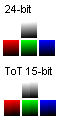
I wouldn't really have to thought so, until I saw my own screenshot there. In that white gradient, the 4 colours ToT has reduced it to (the two middle ones, in particular) are very strange indeed (rgb[240,240,240] and rgb[239,239,239] to be precise).
I'll have to look into it...
Right... I've looked enough. It IS quite different. I'll get to it ASAP. The attachment shows the difference between colours in 24-bit and ToT 15-bit.
I thought the 15-bit would grade the colors in equal steps of about 7 and 8, but they go in steps of 15 and 1. Very odd, because that pretty much means ToT only uses more like 173 (= 4913) distinguishable colors, not 323 (= 32768), not to mention the 24-bit 2563 (= 16777216)... Making it visually closer to 12-bit... 
ToT graphics are getting worse by the minute ...
But maybe this also demonstrates that the color depth as an indicator for image quality is more in our heads than being actually visible. It's not like anyone really noticed ToT is pretty much half the color depth everyone thought it was.
 Attachment: test of time - colours.png Attachment: test of time - colours.png
This has been downloaded 37 time(s).
Last edited by Mercator on 21-09-2003 at 05:30
|
|
| |
|
| |
|
|
|
Catfish
|
|
Wollongong, Australia
Aug 2000
time: 14:28
|
|
quote:
Originally posted by Mercator
 I noticed that. The bitmaps are happy with the darker purple shade as well, it seems (the standard sprites are not). But I decided to blame you. I noticed that. The bitmaps are happy with the darker purple shade as well, it seems (the standard sprites are not). But I decided to blame you. |
Gee, that's very nice of you.
quote:
Originally posted by Mercator
Well, should I add this shade as a standard transparency color as well? Or should I get Angelo Scotto to change his CivConverter bitmap conversion scheme? |
You can do both. It all reduces the probability of a stuff up. Many unit creators accidentally delete the transparent pixel, I probably have too, so these problems won't just be restricted to conversions.
If you have any influence over Angelo, then you can get him to lower the units by 6 pixels, too.  It'd also be nice if the city objective multiplier byte was modified so that all values > 04 were changed to 04 - as you know, x3 or greater objectives are not used at all by ToT - even though it's in the Cheat menu. It'd also be nice if the city objective multiplier byte was modified so that all values > 04 were changed to 04 - as you know, x3 or greater objectives are not used at all by ToT - even though it's in the Cheat menu. 
While we're talking utilities, being the well of knowledge that you are, is there anything around that can easily add rivers to a .sav or .scn file?
|
|
| |
|
|
|
Mercator
|
|
Sorekara no Nanimo
Jan 1970
time: 06:28
|
|
quote:
Originally posted by Catfish
Gee, that's very nice of you. |
quote:
You can do both. It all reduces the probability of a stuff up. Many unit creators accidentally delete the transparent pixel, I probably have too, so these problems won't just be restricted to conversions. |
On second thought... I don't think I will add the darker purple shade. I think it simply affects too many colors. Especially because people will be working with 24-bit bitmaps and won't pay attention to any colors being close to this rather more inconspicuous shade of purple.
I'll add a note on transparency in the readme though.
quote:
If you have any influence over Angelo, [...] |
I'm afraid not, but you can PM him (his username's simply "Angelo Scotto" or e-mail him at his hotmail address: scotto_a (followed by the @ and all, but I don't want him to get spammed).
quote:
While we're talking utilities, being the well of knowledge that you are, is there anything around that can easily add rivers to a .sav or .scn file? |
There are two ways. MapCopy, which can paste a new map (with the rivers added) back into your savegame, or a little engineering trick. These threads should fill you in:
http://apolyton.net/forums/showthre...&threadid=95486
http://apolyton.net/forums/showthre...&threadid=66105
And another thing I just realised, about the color reduction thing... This actually doesn't affect how I reduce color depth from 24-bit to 15-bit, so SpriteGen works as it should after all. It DOES affect color depth increase from 15-bit back to 24-bit though, so I'll have to update CivSprite.
Last edited by Mercator on 21-09-2003 at 15:58
|
|
| |
|
|
|
Catfish
|
|
Wollongong, Australia
Aug 2000
time: 14:28
|
|
quote:
Originally posted by Mercator
On second thought... I don't think I will add the darker purple shade. I think it simply affects too many colors. Especially because people will be working with 24-bit bitmaps and won't pay attention to any colors being close to this rather more inconspicuous shade of purple.
I'll add a note on transparency in the readme though. |
True. I mean I found 3 shades of purple background in the one units file today.
quote:
Originally posted by Mercator
There are two ways. MapCopy, which can paste a new map (with the rivers added) back into your savegame, or a little engineering trick. |
Thanks, unfortunately MapCopy doesn't work with ToT. The second method looks almost as labour intensive as another method I used once, where I flagged all the would-be river tiles with strange combos of units/improvements. These were then easy to find using a hex editor, and then I hex edited the rivers in.
|
|
| |
|
| |
All times are GMT. The time now is 05:28.
Apolyton Time is 00:28. |
top of page
|
|
|
Forum Rules:
You may not post new threads
You may not post replies
You may not post attachments
You may not edit your posts
|
HTML code is ON
vB code is ON
Smilies are ON
[IMG] code is ON
|
|
|
|
|
|






 16-09-2003 20:50


 Thank you! I mean... Thank you.
 |
|