Apolyton Archive  |  Preserved copy of the Apolyton Civilization Site and its forums as they stood in September 2005. Read-only; nothing here can be posted to or replied to.  |  Forum index |  About this archive |  The 1998–2001 UBB forums
Today on Apolyton WARDELL INTERVIEW PROMO A.C.S. HISTORY CHAPTER 4 GET CIV4 /w FREE PLUS! A.C.S. PHOTO GALLERY GET A.O.M. V1.1
Apolyton Civilization Forums
main| civ2| civ3| civ4| smac| ctp2| ron| moo3| galciv| galciv2| alt| about|
ApolytonPLUS | register | search | faq | new posts | pm (-/-) | upload | members
hall of fame new! | civgroups | civgroups news | interviews | the column | radio | chat | directory | news | store | PLUS
Apolyton Civilization Forums : Powered by vBulletin version 2.0.3 Apolyton Civilization Forums > Civilization III > Civ3-Files > UTILITY: UnOfficial Civ3 Scenario Editor
Show a Printable Version | Email This Page to Someone! | Receive updates to this thread | Report this to Apolyton news!
16.Sep: 7 NEW FILES
15.Sep: TRIAL + NO SLEEP = ONE GAME
13.Sep: PATCH THE PREVIOUSLY UNPATCHABLE

bottom of page
   - CIV3 CONQUESTS $29.99 - CIV3 from $9.99
Author
Thread   
Pages (3): [ 1   2   3   ]
< Last Thread     Next Thread > Post New Thread     Post A Reply
jimmyh is offline jimmyh
Warlord
Sunny Old England
Sep 2001
time: 05:18
Post  Old Post 31-03-2002 06:01
Edit/Delete Message Reply w/Quote
#1 Report this post to a moderator
Utility: UnOfficial Civ3 Scenario Editor V0.3 Suffering from ads?

Ok, heres the thrid update for my editor.

New features for this release are:

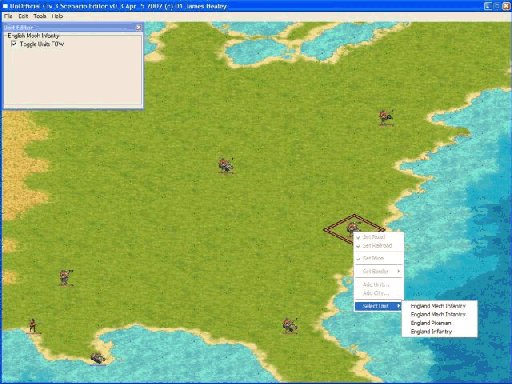
Option to import save games to view the map ( I've tested quite a few save games that I have and there should be no problems with importing the maps now), If you do get any crashes then could you please attach your save game and I'll fix it.

Units should be displayed on the map, ( although the Longbow Man does not display properly for some reason ).

You can move around the map with the cursor keys.
If you left click with the mouse button you'll get another window come up with the units name and nationality.
When you left click on a unit, keep the left mouse button pressed down and you can move the units around on the map.

Then when your done you can export you map.

I do have some other stuff that I was working on but it has not had a great deal of tesing, so it's been taken out for now.

This Utility has been writen/Tested on an AMD ATHLON 1800XP+ with 512mb and a G-Force2

Cheers.
James.

A special thanks to Gramphos for his endless help with the save game file format and to Moeniir(writer of FLICster) for his help with information on palettes in the FLC files.

Attachment: c3se.zip
This has been downloaded 4742 time(s).

Last edited by jimmyh on 08-04-2002 at 12:45

Mizaq is offline Mizaq
Prince
San Diego
Nov 2001
time: 21:18
  Old Post 31-03-2002 06:10 Visit Mizaq's homepage!
Edit/Delete Message Reply w/Quote
#2 Report this post to a moderator
Remove this text

I don't understand why you aren't calling this by its name. Its a palette changer so call it that. False advertising.

What palettes need to have civ colors for the first 96 colors? Everything I have worked on (terrain, wonder splashes, menu screen, buttons, title screen, city view screen) all needed 1-3 colors at the end of the palette and possibly one at the beginning, but otherwise they could be anything.

jimmyh is offline jimmyh
Warlord
Sunny Old England
Sep 2001
time: 05:18
  Old Post 31-03-2002 06:17
Edit/Delete Message Reply w/Quote
#3 Report this post to a moderator
Increase Your PM Length

It will soon become a scenario editor...

Here's a quote from Moeniir(writer of FLICster) as I asked him about the palettes for units.

"The 256 colors that make up a Civ3UnitFlc's palette are not all equal. If you open a FLC in FLICster and go to Palette View, you will see the palette arranged in 16 rows of 16 colors each - the same way that the PaintShopPro palette editor shows the palette. The first 64 colors, or 4 rows, are civ-specific colors, and can change for each civ. Change the Civ Color in the drop down to see this. You should NEVER change the colors in the first 4 rows. Doing so shouldn't break anything, but the effort is futile, since Civ3 will replace the first 4 rows in your unit's palette with a set of Civ-Specific colors anyway.

The last 32 colors (last two rows) are also special - these are the Alpha Blending palette entries. Note that I called them palette entries, not colors. This is because the colors appearing in these positions are just place holders. Each palette position in this range specifies a certain level of Alpha Belending. The last position, which is normally magenta, is used to indicate full transparency. The other 15 colors in the last row form a transparency ramp, down to fully opaque black. These varying levels of transparency are used to create shadow effects. The 16 positions in the next-to-last line seem to form a ramp from transparent to fully opaque white, and are used to form smoke and haze effects. These palette entries are used in animations like BattleshipAttackA.flc to create the smoke from the big guns. Please note that the gray values I use when simulating alpha blending are my best guesses - I haven't been able to get any info about how the game ramps everything. Again, you should not edit these colors unless you know what you are doing.

The rest of the palette is yours to edit. Just be sure you NEVER perform an operation like Increase colors or Decrease colors - this will totaly screw up your palette. When creating your animation, remember that if you use any colors in the first 4 rows, they will be subject to change with each civ, and if you use any colors in the last two rows, you will get shadow or haze in game."

James.

Mizaq is offline Mizaq
Prince
San Diego
Nov 2001
time: 21:18
  Old Post 31-03-2002 08:39 Visit Mizaq's homepage!
Edit/Delete Message Reply w/Quote
#4 Report this post to a moderator
Full PM-box? Change here!

oh alright, it is for unit editing. A palette utility that help with unit graphic editing is a far cry from a scenario editor.

abcman is offline abcman
Chieftain
Finland
Nov 2001
time: 05:18
Arrow  Old Post 31-03-2002 16:49 Visit abcman's homepage!
Edit/Delete Message Reply w/Quote
#5 Report this post to a moderator
Support Apolyton, buy GURPS/ Alpha Centauri

Great job!

Yeah. Haha. It's called a scenario editor but the only thing you can do in it is change that palette thing! That is an awesome function (at least for me), but you really should advertise it as a "palette editor" too!
I'm sure many has run into this problem excpet for us two.
I understand that you mean to upgrade it to a scenario editor soon. Maybe you can call it a scenario/palette editor?

abcman is offline abcman
Chieftain
Finland
Nov 2001
time: 05:18
Lightbulb  Old Post 31-03-2002 17:04 Visit abcman's homepage!
Edit/Delete Message Reply w/Quote
#6 Report this post to a moderator
Support Apolyton, buy Civilization 2

Hmm. Are you really sure the editor works as it should?

Maybe it's just me that can't use it.

First I loaded my 16 million color picture. Then I resaved it as a PCX file and changed the number of colors to 160.
Then I used your program on it.

But when I opened the picture the colors were all messed up.
It seems like even though the colors had been moven "forward" on the palette list 4 rows the picture was still using the same palette "numbers". (like where it used palette entry 76 it still uses palette entry 76.)
So let's say I had a gray color on number 76. And 4 rows before on the same place (about number 12) I had green.

Then the place which actually should be grey was green.

jimmyh is offline jimmyh
Warlord
Sunny Old England
Sep 2001
time: 05:18
  Old Post 31-03-2002 17:14
Edit/Delete Message Reply w/Quote
#7 Report this post to a moderator
Increase Your PM Length

It won't rearange the image so that it uses the correct index, you'll need to save out the palette in Paint Shop Pro and then load in back in to your original image(the 256 image before you used my editor) and that should rearrange it properly. I will put in functionality so that it arranges the colours in the image also.

James.

abcman is offline abcman
Chieftain
Finland
Nov 2001
time: 05:18
  Old Post 31-03-2002 17:32 Visit abcman's homepage!
Edit/Delete Message Reply w/Quote
#8 Report this post to a moderator
Inflate your Upload Space

Sorry. I've read what you wrote several times, but I don't really understand what you mean... Could you explain it again?
Like, should I first change the number of colors to 256, and then save the palette as a file? And then...??

abcman is offline abcman
Chieftain
Finland
Nov 2001
time: 05:18
  Old Post 31-03-2002 23:53 Visit abcman's homepage!
Edit/Delete Message Reply w/Quote
#9 Report this post to a moderator
Increase the size of your Attachments

Please remember to answer my question. Thanks. :-)

jimmyh is offline jimmyh
Warlord
Sunny Old England
Sep 2001
time: 05:18
  Old Post 01-04-2002 03:55
Edit/Delete Message Reply w/Quote
#10 Report this post to a moderator
Support Apolyton buy from Amazon

Ok, let's try and make this as painless as possible.

Let's say you have your image which was taken from another game, reduce it to 256 colours ( I take it you are using Paint Shop Pro ), now save this out as a PCX file, call it mypcx.pcx.

Now load up my editor and select the save palette option, select the PCX file which you have just saved out(mypcx.pcx), choice a civ colour to go with it and press OK. Close the editor.

James.

Last edited by jimmyh on 02-04-2002 at 00:05

abcman is offline abcman
Chieftain
Finland
Nov 2001
time: 05:18
  Old Post 01-04-2002 16:29 Visit abcman's homepage!
Edit/Delete Message Reply w/Quote
#11 Report this post to a moderator
Support Apolyton, buy Call to Power 2

Ahh. Thank you for the help.
Now that I've got your palette editor (and knows how to use it) I can start putting those units into CIV3!

(btw. my units are not rippoffs from computer games! It's just that I make them in 16 million colors. That's the only way you can use for example the darken lightness tool. I don't really enjoy the picking of colors you have to do when drawing with a palette)

Anyway. Thanks again for your awesome program!

jimmyh is offline jimmyh
Warlord
Sunny Old England
Sep 2001
time: 05:18
  Old Post 01-04-2002 16:49
Edit/Delete Message Reply w/Quote
#12 Report this post to a moderator
Browse Apolyton AD-FREE

quote:
Originally posted by abcman
Ahh. Thank you for the help.
Now that I've got your palette editor (and knows how to use it) I can start putting those units into CIV3!

(btw. my units are not rippoffs from computer games! It's just that I make them in 16 million colors. That's the only way you can use for example the darken lightness tool. I don't really enjoy the picking of colors you have to do when drawing with a palette)

Anyway. Thanks again for your awesome program!


Don't forget to post your units here at apolyton!

I was just just using the ripoff from another game as an example, btw all of my work would be ripoffs from other games, cos I can't draw to save my life, hehe

In the next release I should be able to get it sort the palette out instead of having to save the palette out in Paint Shop Pro, and once I get the loading PCX files you should be able to import save games and view the map, up until now I've been converting the graphics to BMP files and then loading those in.

Cheers.
James.

jimmyh is offline jimmyh
Warlord
Sunny Old England
Sep 2001
time: 05:18
  Old Post 02-04-2002 00:10
Edit/Delete Message Reply w/Quote
#13 Report this post to a moderator
Suffering from ads?

The next update is avaliable, check the first post for the attachment and a list of features.

Cheers.
James.

heardie is offline heardie
Prince

Aug 1999
time: 15:18
  Old Post 04-04-2002 07:00
Edit/Delete Message Reply w/Quote
#14 Report this post to a moderator
Support Apolyton buy from Amazon

Aghhh, doesn't work for me
It freezes my mouse. Then when I try and open a save file I get an illegal operation.

Using a AMD K-6 400 with 196mg ram, 32mgbit Video card

jimmyh is offline jimmyh
Warlord
Sunny Old England
Sep 2001
time: 05:18
  Old Post 04-04-2002 11:32
Edit/Delete Message Reply w/Quote
#15 Report this post to a moderator
Support Apolyton, buy Civilization III: Complete

quote:
Originally posted by heardie
Aghhh, doesn't work for me
It freezes my mouse. Then when I try and open a save file I get an illegal operation.

Using a AMD K-6 400 with 196mg ram, 32mgbit Video card


Actually if you could attach the save game file you are trying to load and I'll have a look to see what the problem is.

I know there is one problem when loading, but it doesn't happen all of the time, I think it could be a memory leak some where, will be giving it a good going over this weekend.

Also being able to move units around on the map will be in on the next version.

Cheers.
James.

Last edited by jimmyh on 04-04-2002 at 12:43

jimmyh is offline jimmyh
Warlord
Sunny Old England
Sep 2001
time: 05:18
  Old Post 06-04-2002 01:38
Edit/Delete Message Reply w/Quote
#16 Report this post to a moderator
Preview screen shot Support Apolyton, buy Alpha Centauri

I've attached a screen shot of the next release, as you can see the maps been imported along with the units ( which you can move around the map ), that's pretty much it for this release apart from the other stuff you can see.

I may release this in about 6 hours, it depends on how things go, if not then it'll be some time tomorrow.

Cheers.
James.

Attachment: scrnshot.jpg
This has been downloaded 3252 time(s).

MarkG is offline MarkG
Grand Lord of Apolyton, Owner of all this land as far as the eye can see

Donate to the Red Cross
Macedonia, Greece
Jan 1970
time: 07:18
  Old Post 06-04-2002 01:51 Visit MarkG<br><img src=/forums/images/admin-icon.gif>'s homepage!
Edit/Delete Message Reply w/Quote
#17 Report this post to a moderator
Re: Preview screen shot Increase Your PM Length

quote:
Originally posted by jimmyh
the maps been imported along with the units ( which you can move around the map )
well, that DOES bring your program much more closer to a scenario editor

Tuberski is offline Tuberski
Emperor
ACK!!! PTHBBPPPTTT!!!!
Feb 2002
time: 23:18
  Old Post 06-04-2002 09:17 Visit Tuberski's homepage!
Edit/Delete Message Reply w/Quote
#18 Report this post to a moderator
Re: Re: Preview screen shot Support Apolyton buy from Amazon

quote:
Originally posted by MarkG
well, that DOES bring your program much more closer to a scenario editor


Seems like he is headed in the right direction.

jimmyh is offline jimmyh
Warlord
Sunny Old England
Sep 2001
time: 05:18
  Old Post 07-04-2002 16:34
Edit/Delete Message Reply w/Quote
#19 Report this post to a moderator
Help yourself to an AD-FREE life

The next update is avaliable, check the first post for the attachment and a list of features.

Cheers.
James.

Metaliturtle is offline Metaliturtle
King
University of Wisconsin Stevens Point
Mar 2002
time: 23:18
  Old Post 07-04-2002 21:19
Edit/Delete Message Reply w/Quote
#20 Report this post to a moderator
Support Apolyton, buy GURPS/ Alpha Centauri

How do I get this thing to work, all I downloaded was a thing called "attachment", please help.

ixnay is offline ixnay
ACS Staff: 'RoN' Content Editor
I <3 etna, omg disgaea fag
Jan 1970
time: 22:18
  Old Post 07-04-2002 22:09 Visit ixnay<br><img src=/forums/images/staff-icon.gif>'s homepage!
Edit/Delete Message Reply w/Quote
#21 Report this post to a moderator
Tired of ads?

rename it attatchment.zip.

Gramphos is offline Gramphos
ACS Civ III Files Manager, Prince of Development
Chalmers, Sweden
Apr 2001
time: 06:18
Thumbs up  Old Post 08-04-2002 01:05
Edit/Delete Message Reply w/Quote
#22 Report this post to a moderator
Put an end to popups!

Good to see this editor posted at last...

Too bad I were away when you got ready to post it. Anyway, i'll move it now...

As I see it is a news-item I see no reason to announce it further...

Gwydion62 is offline Gwydion62
Settler
Vienna, Austria
Dec 2001
time: 06:18
Question  Old Post 08-04-2002 02:04
Edit/Delete Message Reply w/Quote
#23 Report this post to a moderator
Black screen Support Apolyton, buy Alpha Centauri

I opend the *.zip, installed the file to a fileorder and then used the*.exe. When I named the path of civ3 and selected the save.file the screen was black, no map, no units only the brown frame.

What was that I maked wrong?

jimmyh is offline jimmyh
Warlord
Sunny Old England
Sep 2001
time: 05:18
  Old Post 08-04-2002 03:21
Edit/Delete Message Reply w/Quote
#24 Report this post to a moderator
Increase the size of your Attachments

Hi,

Could you please post the save game you are trying to load and I'll have a look at it for you.

Nice to see you are back gramphos, since people only post when some thing is wrong, could any one tell me if they are actually getting it to work.

Cheers.
James.

spicytimothy is offline spicytimothy
Chieftain
Los Angeles
Nov 2001
time: 21:18
  Old Post 08-04-2002 06:51
Edit/Delete Message Reply w/Quote
#25 Report this post to a moderator
Lose 30 kilos (of popups)

I still can't figure out how to download from this site... everytime I try it only lets me download a document titled "attachment"...

senowen is offline senowen
Chieftain
of the night
May 2001
time: 00:18
  Old Post 08-04-2002 09:37
Edit/Delete Message Reply w/Quote
#26 Report this post to a moderator
Support Apolyton

quote:
Originally posted by spicytimothy
I still can't figure out how to download from this site... everytime I try it only lets me download a document titled "attachment"...


Rename the file to c3se.zip or whateveryouwant.zip and it should download a zip file. Whatever kind of file you are trying to download be sure to rename it correctly.

PerpetualNewbie is offline PerpetualNewbie
Chieftain

Mar 2002
time: 05:18
  Old Post 08-04-2002 10:30
Edit/Delete Message Reply w/Quote
#27 Report this post to a moderator
Support Apolyton, buy Civilization 2

I got the same thing as Gwydion62. Just a black screen with a brown box.

Attachment: 4000.zip
This has been downloaded 16 time(s).

jimmyh is offline jimmyh
Warlord
Sunny Old England
Sep 2001
time: 05:18
  Old Post 08-04-2002 12:22
Edit/Delete Message Reply w/Quote
#28 Report this post to a moderator
Suffering from ads?

quote:
Originally posted by PerpetualNewbie
I got the same thing as Gwydion62. Just a black screen with a brown box.


Ok, I've downloaded you save file and there's nothing wrong with it, since your getting no visuals at all, I'm guessing that the civ3 graphics are not being loaded, so I've uploaded a new version which will write some debug info out to a file called debug.log.

So if any one has any problems then please could you post file also.

And just to take a guess at the black screen problem, at the moment you need to run you windows desktop at 32 bit, otherwise the pcx files won't be loaded.

When people post their problems, could you post the save file, the debug.log and give your machine specs.

Cheers.
James.

PerpetualNewbie is offline PerpetualNewbie
Chieftain

Mar 2002
time: 05:18
  Old Post 08-04-2002 19:53
Edit/Delete Message Reply w/Quote
#29 Report this post to a moderator
Enter the AD-FREE zone

OK. Changing to 32-bit made it display, sort of. Water looked fine, but all the land tiles I saw had the bottom half covered by a magenta triangle, coastal tiles had just the bottom quarter magenta, the quadrant determined by which side of the tile was land.

As it was loading, I noticed the first time the graphics loaded, the bar went all the way across, the second time, it only went about 1/4 of the way up, and then went straight to the display.

I left-clicked on the first unit I encountered and it crashed. Here was the windows Details stuff, if it helps:

-----

C3SE caused an invalid page fault in
module C3SE.EXE at 0137:00401034.
Registers:
EAX=027e2d80 CS=0137 EIP=00401034 EFLGS=00010246
EBX=0067f3b6 SS=013f ESP=0067f328 EBP=0067f384
ECX=00000000 DS=013f ESI=000083da FS=3b5f
EDX=00000000 ES=013f EDI=0067f36c GS=3eff
Bytes at CS:EIP:
8b 54 d1 08 8b 08 52 8b 14 8d b0 6f 41 00 0f be
Stack dump:
00000000 81e0abd8 16af8000 2bdc0000 3cdc8358 834c177f 843a3eff 00833eff 2bdc16af 00050003 005c0003 004c0000 3f6f8368 16af1797 00032bdc 0003000f

-----

My machine at the office is awfully old, and that might be the problem. (P2-300, 64 megs)

jimmyh is offline jimmyh
Warlord
Sunny Old England
Sep 2001
time: 05:18
  Old Post 08-04-2002 20:04
Edit/Delete Message Reply w/Quote
#30 Report this post to a moderator
Support Apolyton, buy Galactic Civilizations: Deluxe Edition

I'm more interested in the crash at the moment so if you could you please post the save game file.

And the magenta thing will be related to your graphics card and the way that I handle RGB colours.

James.

 
Pages (3): [ 1   2   3   ]
< Last Thread     Next Thread > Post New Thread     Post A Reply
All times are GMT. The time now is 05:18.
Apolyton Time is 00:18.
    top of page
Rate This Thread:
Forum Jump:
Forum Rules:
You may not post new threads
You may not post replies
You may not post attachments
You may not edit your posts
HTML code is ON
vB code is ON
Smilies are ON
[IMG] code is ON


Contact Us - Apolyton Civilization Site - Support Us!

Building a better Apolyton through better information. Click here and take our poll!
Non-US visitors, click here!

Powered by: vBulletin Version 2.0.3
Copyright ©2000, 2001, Jelsoft Enterprises Limited.

Page generated in 0.0597 seconds (92.62% PHP - 7.38% MySQL) with 30 queries
Page Loading Time:

Support Apolyton: Amazon USA | Amazon UK | Amazon DE | Amazon FR |
Support Apolyton and get FREE PLUS, Buy from Chips&Bits: Galactic Civilizations | Galactic Civilizations: Deluxe Edition | Call to Power 2 | Civilization: The Boardgame | GURPS/ Alpha Centauri | Alpha Centauri | Civilization IV | Civilization III: Complete |


Front Page | Civilization IV | Civilization III | Civilization II | Call to Power II | Alpha Centauri | Master of Orion III
Rise of Nations | Galactic Civilizations | Galactic Civilizations II | Misc
Alt.Civs | Civ I | C:CtP I | About | News | Directory | Apolyton Store | Forums | Chat | Columns | Interviews | Newsletter
Scenario League | CSC | Clash of Civs | Spanish Site | CtP Maps | Cradle of Civ | WesW's Ctp1/2 Site | Civ3 Haven

apolyton.net | apolyton.com | civilization2.net | civilization3.net | civilization4.net | civilizationiv.info | calltopower.net | galciv.net | galciv2.net | moo3.net