|
| |
|

|
Locutus

|
|
ACS CTP1/2 Manager & Civ4 Co-Manager
|
 |
Hengelo, The Netherlands
Nov 1999
time: 06:20
|
|
With considerable delay, I finally present the second tournament. In honor of Dale's departure I've titled it... Dale's Departure  (and also because it was Dale who created the game of this month (and also because it was Dale who created the game of this month  ) )
Details on installation of Apolyton Pack - which is required for this month's tournament - will follow (tomorrow, I hope  ), I'm very tired now and would only screw it up... ), I'm very tired now and would only screw it up...
Good luck to all!
PS let me know if there are any problems. As I said I didn't create the game myself and because my PC is broken I can't test the game so I don't know for sure if everything works as it should...
Theme: Dale`s Departure
Mod: Super Apolyton Pack v2.0
Level: Impossible
Size: Huge Map
Barbarians: Maurauders
Ocean-Land: 50%
Island-Continent: 50%
Wet-Dry: 30%
Warm-Cold: 50%
Uniform-Diverse: 70%
Few Goods-Many Goods: 50%
World shape: Earth World
Bloodlust: Off
Pollution: On
Civilization: Australians
Opponents: 8 (Mexican, Native American, Mayan, Chinese, Ethiopian, Turkish, Roman)
Victory types allowed: All

Game file
Website
Last edited by Locutus on 19-07-2002 at 16:21
|
|
| |
|
|
|
Locutus
|
|
ACS CTP1/2 Manager & Civ4 Co-Manager
|
|
Hengelo, The Netherlands
Nov 1999
time: 06:20
|
|
As promised, here are instructions for installing Apolyton Pack:
Edit: this info can also be found in the Tournaments Section.
Installing Super Apolyton Pack v2.0
Note: all folder paths mentioned below are relative paths from the main CtP2 folder, the folder in which you installed CtP2. By default this is often C:\Program Files\Activision\Call to Power 2.
1) Make sure you have the patch (v1.11) and ModSwapper (v1.5) installed. You can download these from the Files Section.
2) Open the file ctp2_program\ctp2\userprofile.txt and look for the line that starts with DebugSlic. Make sure this is set to No, so the line should read DebugSlic=No.
3) Download the Super Apolyton Pack from our temporary database, here.
4) Unzip (see here) the file you downloaded into your main CtP2 folder. When you're prompted if you want to overwrite battleview.ldl and scenarioeditor.ldl, confirm this.
5) If you have a non-English or non-German version of CTP2, you must copy all files and folders from the 'english' or 'german' folder (depending on which language you prefer) into your own language folder in order for the Pack to work. (Hopefully a French version of the game will also become available at some point in the future.)
6) Start Modswapper. You should now see the option "Apolyton Pack! CTP2 the way it should be" next to the existing options ("Original Game" and maybe others, depending on what other mods you already installed). Whenever you want to start a new Apolyton Pack game or continue an old game that was started with the Apolyton Pack, you will have to choose this option in ModSwapper before you hit 'Launch' to start the game.
Zipped files
The savegames for the Tournaments, as well as most of the mods that these Tournament games are played with, are 'zipped', they are stored in a special (compressed) format to make them smaller and thus faster to download. In order to be able to use such files you need to 'unzip' them. Some Windows versions have an unzip tool by default. If this is the case on your system, you should be able to double-click the file in Explorer and it will be unzipped. Since I've never actually used this feature myself, I can't explain how it works in detail but, as with many Windows features, it should be fairly self-explanatory and help should be available. In any case, if this doesn't work on your system (or you don't like how it works), you should download a program like WinZip from a place like www.downloads.com, at the time of writing, the latest version could be downloaded from here (link might go obsolete as newer version are being developed all the time). To be able to participate in the Tournaments and download mods, you should download and install a zip program like this and the above trick of double-clicking a file in Explorer should work. Different programs work in different ways, but usually this will bring up a window with all files included in the zip file (this could 1, it could also be 10,000) and a number of buttons. Simply hit the button called 'Extract' (or something similar) and select the location where the file(s) should be extracted (in case of a mod, usually your main CtP2 folder, in case of a savegame, usually your savegame folder: ctp2_program\ctp2\saves\games\).
When you want to upload the finished Tournament savegames, so that you can be included in the rankings, you'll have to 'zip' these files yourself. With WinZip, you can simply right-click the file in Explorer and select the option 'Add to Zip' and, after choosing a name and location for the zipfile, the file(s) will compressed in a zipfile. Then, press the 'Post Reply' button on the thread where you want to submit the file to, and a screen will come up with a number of fields. Right above the 'Submit Reply' button (near the bottom) there is an 'Attach file' option. Press the 'Browse...' button and select your file. After writing your reply (which should at least mention the type of victory that you accomplished and optionally other info/comments) and hitting the 'Submit Reply' button, your reply will be posted with the zipfile attached to it.
Last edited by Locutus on 27-06-2002 at 17:16
|
|
| |
|
| |
|
| |
|
| |
|
| |
|
| |
|
|
|
Locutus
|
|
ACS CTP1/2 Manager & Civ4 Co-Manager
|
|
Hengelo, The Netherlands
Nov 1999
time: 06:20
|
|
quote:
Originally posted by centrifuge
When are you getting that new computer, that I've seen you talk about? Hopefully, pretty soon, so that you can have a go at the tournament game... |
Could be a few weeks. I'm currently borrowing my sister's pc but I can't install CtP2 here  I'm trying to borrow an extra HDD somewhere, but it might be a while before I have everything up and running I'm trying to borrow an extra HDD somewhere, but it might be a while before I have everything up and running
quote:
I've only encountered one problem with the game so far (Aside from the early struggle with the barbarians from above ) At about 800AD, the game crashed without warning, and continued to crash until I added Martin's Slic file that stops the ability to pillage neutral tile improvements, and did a /reloadslic. |
Hmm, I thought that code was part of AP... Oh well, that's something for others to keep in mind then, I'll add instructions for that to the website later...
|
|
| |
|
|
|
centrifuge
|
|
CoT and anyone else that may need it.
forums/attachment.php?s=&postid=941205
otherwise it's in the super apolyton pack thread of the Mods section.
|
|
| |
|
| |
|
| |
|
| |
All times are GMT. The time now is 05:20.
Apolyton Time is 00:20. |
top of page
|
| archivepost |
|
Forum Rules:
You may not post new threads
You may not post replies
You may not post attachments
You may not edit your posts
|
HTML code is ON
vB code is ON
Smilies are ON
[IMG] code is ON
|
|
|
|
|
|





 26-06-2002 03:59


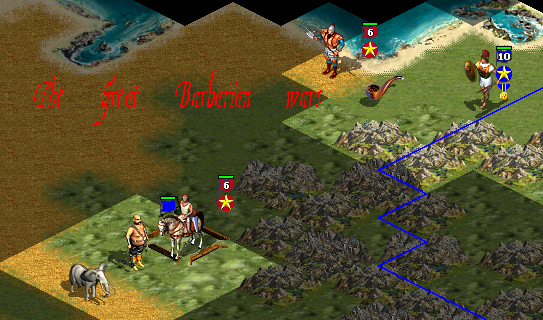
 The differences in this tournament compared to the last one are amazing... It's so much fun being the weakest Civ in the world


 Attachment:


 )
)

 And, I think,it was because of my whineing that he wrote it, very embarassing!what was the title of the thread you got it from?


 If I remember correctly it was in a thread called:


 |
|