|
| |
|

|
E
|
 |
July 24,2005 Ctp2 Tiles in sig!
May 1999
time: 21:23
|
|
Final tilefile for version 1 is in the Ekmek Tile thread
you can get the gtset555 and the TGAs there. Thanks for everyone's help.
http://www.apolyton.net/forums/show...&threadid=96137
(original post follows)
Since I'm stuck in Kuwait and cant install games I've been able to get tileedit working and started converting some of SNOOPY's terrain graphics from Civ3 for the tile files in CTP2. And since I'm not a pro at this I might need some help.
1. I have them in Bitmaps, I think they have to be TGAs, is there a specific format etc?
2. Is there a list of terrains so I know what to replace
3. Anyone willing to test it once I get it compiled because I can't play and games on military computers.
4. Are there already better Terrain graphic mods and I might as well stop this?
I'll probably have a lot more questions later...
attachment removed...latest at bottom of thread
Last edited by E on 01-10-2003 at 01:34
|
|
| |
|
|
|
Maquiladora
|
|
1. 16/24/32bit uncompressed tga's
2. Ive attached the ctp2 terrain.txt
3. Yep
4. Ive almost finished converting the ctp1 terrains to use in a scenario/mod but apart from that no ones made any terrain mods AFAIK.
 Attachment: terrain.txt Attachment: terrain.txt
This has been downloaded 11 time(s).
|
|
| |
|
|
|
Maquiladora
|
|
How are you choosing which parts of the Civ3 terrain to convert? For example to replace the first plains tile, i found it best to just pick the one that closely matches the ctp2 terrain and the just replace the tga. Fortunately the first plains tile doesnt have any borders so you dont have to worry about it interconnecting until you make the borders.
Youre only replacing the ctp2 terrain and border tga's right? And not creating new rules?
|
|
| |
|
|
|
J Bytheway
|
 |
England
Jul 2001
time: 05:23
|
|
The one with the mixed colours is the one that the game actually uses. You can make the colours look normal by choosing an appropriate option in TileEdit somewhere.
You can import new graphics either one at a time with the TileEdit GUI or else by writing a script file like when you make a sprite (only much longer...). If you export to script & tgas you can see what's going on.
Last edited by J Bytheway on 19-11-2002 at 21:01
|
|
| |
|
|
|
E
|
|
July 24,2005 Ctp2 Tiles in sig!
May 1999
time: 21:23
|
|
My job changed so it has slowed down progress. On top of that I found oput that this computer doesnt have the software to convert to TGAs so I might need help with that. Here is what I have so far. note that i used the colony and other improvement graphics as which i figure can touch up ctp2 also.
Last edited by E on 22-12-2002 at 19:15
|
|
| |
|
|
|
Maquiladora
|
|
Looks good E. Keep converting them if you can, im using them.
If you want to convert them to tga's before you can download a trial for Paint Shop Pro or Photoshop, probably need broadband too.
By the way are some of these from Play the World? Only i havent seen some of them before. Hopefully i can get a copy so i can use the new terrains.
|
|
| |
|
|
|
Maquiladora
|
|
I just noticed theyre all 98 x 76, to import them into TileView they need to be 94 x 72
|
|
| |
|
|
|
Maquiladora
|
|
I cropped all the images to 94*72 and converted them to 16bit uncompressed tga's.
 Attachment: e_snoopys.zip Attachment: e_snoopys.zip
This has been downloaded 6 time(s).
|
|
| |
|
|
|
Maquiladora
|
|
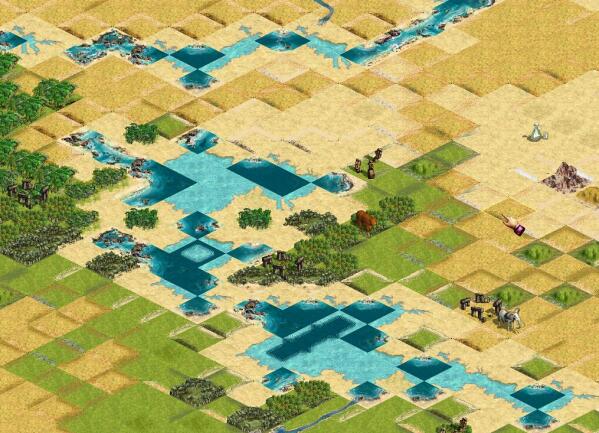
I wasnt gonna post a screenshot, but heres basically how far ive got with it so far and it kinda demostrates why you need new borders most of the time. Theyre pretty easy to make if you have a full isometric of the tile, just "cut-out" the border with the "paste as transparent" command, kind of like a pastry cutter.
Also ive been experimenting with using no borders at all, using alot more rules and unique tiles, so theres no need for borders and you can have a much more random looking terrain spread. Ill have to see how exactly how hardcoded ctp2 allows for that though.
 Attachment: dodgybeachscreenie.jpg Attachment: dodgybeachscreenie.jpg
This has been downloaded 330 time(s).
|
|
| |
|
|
|
Maquiladora
|
|
No, i do want to use borders, it was just an idea for much more detailed and random looking terrain, i havent tried it yet. Leave the borders until the very end though. As you can see in the upper right hand corner of the screenshot, i already made a few borders for the plains tile, it molds pretty nicely.
1. To make terrain without using any borders, involves deleting all/most of the borders from the tile file OR making them invisible somewhere. Then define LOTS of rules to each tile, (that would increase to about 400 tiles) then when it generates the map it would place each terrain next to the terrains it was told to be next to.
I imagine that this would create slightly boring pattern though, it may need a couple of borders somewhere to create variation.
2. Yeah ive looked at them, they look pretty good. I think its best to do all the terrains first, although if you get bored with making the terrain sometimes (i know i do) switch and mess with the tile imps. They can be done too.
Im a little preoccupied with my scenario at the moment, i usually switch jobs every so often, but it all gets done eventually.
|
|
| |
|
|
|
Maquiladora
|
|
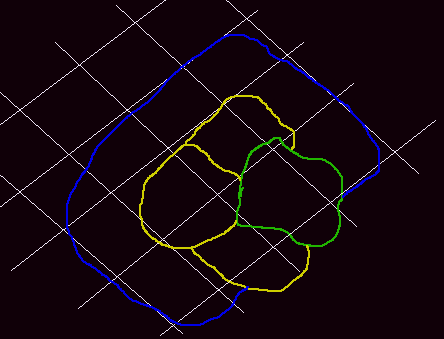
I have wondered about it, but i figured the only way to make it appear like this is by making a sort of jigsaw on the tiles, but with the right combination of tiles next to each other, it would look like the tile is less square because it would "invade" more into another square but still be recognizable as its own square.
Borders have to be the size and shape they are, although borders dont have to be used at all, but that requires alot of rules to make sure the tiles fit together where and when they should (this is how beach tiles work). If you experiment with that its probably best to change one rule at a time then test to see the outcome.
Excuse my painful example. I dont think you coud overlap as much as this into beach tiles (for naval units movement), but the land tiles you could go almost half way into another land tile as long as it was recognizable.
Green - grassland, Yellow - plains, Blue - beach tiles w/ sea.
 Attachment: ugh.gif Attachment: ugh.gif
This has been downloaded 198 time(s).
|
|
| |
|
|
|
Maquiladora
|
|
quote:
The tgas that are all the strange colors that the game uses, do I have to change my tiles to those colors if so how? |
Thats the in-game colour mode, it will generate that when you put them into tileview so you dont need to edit it to those colours.
|
|
| |
All times are GMT. The time now is 05:23.
Apolyton Time is 00:23. |
top of page
|
| archivepost |
|
Forum Rules:
You may not post new threads
You may not post replies
You may not post attachments
You may not edit your posts
|
HTML code is ON
vB code is ON
Smilies are ON
[IMG] code is ON
|
|
|
|
|
|





 16-11-2002 21:44


 Its been a long time i dont have CtP2 installed even at the moment with work and stuff i only have time for playing, if that
  I still have all the work you did on cd backup but its on freeze at the moment.
 |
|