|
| |
|

|
J Bytheway
|
 |
England
Jul 2001
time: 05:32
|
|
quote:
Originally posted by Flinx
How do you do that?  |
Assuming that you normally start CTP2 through the start menu then you'll have to go to the properties of the shortcut, and look at the 'Target:' field, which, for example, in my setup looks like this:
F:\Games\CTP2Src2\ctp2_code\ctp\ctp2.exe
And then add the desired command line parameter, like this:
F:\Games\CTP2Src2\ctp2_code\ctp\ctp2.exe nointromovie
There are two possible problems:
1. Your CTP2 shortcut presently points at the loader in the main ctp2 directory, rather than the "real" executable, which is under ...\ctp2_code\ctp or ...\ctp2_program\ctp depending on whether you compiled it yourself or not. If so, change it - it'll save you time.
2. Your CTP2 path contains spaces (e.g. "Program Files") in which case you may need to remove them by using the 8.3 versions (e.g. "Progra~1"), because the quoting system doesn't handle command line parameters very well.
Other methods you could use:
- Open a command prompt, navigate to the CTP2 directory and run "ctp2 nointromovie" from there.
- Create a batch file in the same directory as the executable which calls CTP2 with the right command line parameters.
|
|
| |
|
|
|
BureauBert
|
 |
Vienna, Europe
Apr 2003
time: 06:32
|
|
Thank you Martin for proposing a workaround concerning "GrantAdvance"  . I will give it a try and post ... . I will give it a try and post ...
Unfortunately the Event:CreateBuilding has no corresponding function - so I will have to leave this one for the moment.
I understood that the scripts are somehow compiled (or just "debugged", checked, whatsoever) at gamestart for running better at runtime, and that the error I get is intended to be thrown at the first occasion even with DebugSlic=No.
But using the same scripts with Activision's patch and DebugSlic=No did not result in any error messages - my possibly over-SLICed Mod-monster on a monstrouos map just became very, very slow at certain point  . .
The behaviour of Activision's patch was: With DebugSlic=Yes I got the same error messages once at gamestart and every time the "buggy" function was called in-game. With DebugSlic=No I got neither. I must admit that I prefered this behaviour because, though everybody should try to produce "clean" SLIC-code, it is just impossible with a couple of functions/event handlers (in their original/current implementation) because they are buggy themselves. AFAIK there are several functions that work as expected in-game (since experienced SLICers figured out how to use them  ) but are not recognized as correct SLIC by the debugger, because the debugger is buggy. As J Bytheway said: ) but are not recognized as correct SLIC by the debugger, because the debugger is buggy. As J Bytheway said:
quote:
Fixing the root problem which causes the error will probably be rather harder though |
In the meantime, if it is possible with reasonable effort, dropping the mostly useless error-messages at all with DebugSlic=No, as in Activision's patch, would IMHO be a good mid-term solution 
|
|
| |
|
| |
|
| |
|
|
|
drulius
|
|
Lubbock, Tx USA
Jan 1970
time: 23:32
|
|
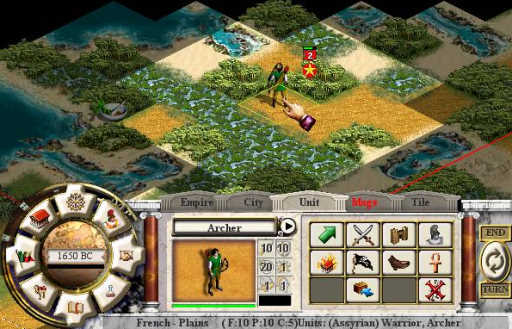
Still playing with the 2004[1].04.03.CTP2Playtest, but I don't think this would have changed with the new update. Early in a game, I explored a section of the map by 3250bc, and didn't go back until 1650bc. By then, the French had settled in the area just along the edge of where I had explored, and their territory extended well into the area I had explored.
When mousing over French squares, the French ownership was labeled in the ticker data at the bottom of the command window, before the border was revealed by "finding" the French city responsible for the ownership.
I think a picture will explain it better. But I think it is not supposed to be telling the player which direction the enemy is hiding. Is this something old or new?
 Attachment: betterres.jpg Attachment: betterres.jpg
This has been downloaded 112 time(s).
Last edited by drulius on 19-04-2004 at 11:47
|
|
| |
All times are GMT. The time now is 05:32.
Apolyton Time is 00:32. |
top of page
|
|
|
Forum Rules:
You may not post new threads
You may not post replies
You may not post attachments
You may not edit your posts
|
HTML code is ON
vB code is ON
Smilies are ON
[IMG] code is ON
|
|
|
|
|
|





 18-04-2004 23:59





 .
. 


 |
|