|
| |
|
| |
|
| |
|
| |
|
| |
|

|
Asher
|
 |
Calgary, Alberta
Nov 1999
time: 22:22
|
|
quote:
Originally posted by Urban Ranger
What doesn't do for e-mail? Okay, for starters, how sophisticated are the filter rules? How do you set up groups of people to set e-mail to? How well does it manage the address book? Can you set it up so that it does not run any Java, Javascript, and other assorted junk? Can you set it up in such a way that attachments are not displayed automatically? |
What CAN'T you do with Outlook's filters?
Groups of people to send email to? Click their name in the address book, then the -> arrow -- or type in their emails separated by a ; -- or use CC -- or make a contact list to send to...
How well does it manage the address book? Very well, the better question is what DON'T you like about how it manages it?
Yes, you can change how it runs Java/JS/other assorted junk.
Yes, you can change it so attachments don't display automatically (that's how mine is set to).
As usual, UR, you've shown a stunning ignorance about the product. No wonder why you walk around screaming it's crap -- you're not different than the other Linux zealots.
|
|
| |
|
| |
|
|
|
Rasbelin

|
 |
Tampere (Tammerfors), Finland
Nov 1999
time: 07:22
|
|
Doh, just as MS Outlook has a calendar feature, it's still doesn't mean it's a good e-mail client. BTW, you still have to pay for MS Outlook as it's a part of MS Office, unlike MS Outlook Express that doesn't have the calendar feature.
Anyway, let's see if you do your tasks with some other e-mail client. I choose Netscape Mail from Netscape 7 as the one to compare.
First of all Hotmail isn't a necessity. You could well use Netscape webmail, so I "convert" your account into a Netscape webmail account and setup Netscape Mail so that you can get your messages from that account using IMAP. Done.
POP3 and IMAP accounts? No problem - added and done.
And now the filters. A universal filter for all accounts that will move all incoming messages into a specific folder. Done. Now we just need a filter for the classmates so that their messages are forwarded into a special folder and finally any needed junkmail filters so that the messages are deleted automatically. Done.
Finally that calendar you seem to love. We open My Sidebar in Netscape Mail and add the Calendar sidebar tab. Voilá! Done. Now you just need to login using your Netscape Network username, but as you already have that after setting up a webmail account, you will only need login now. Use cookies and you can forget about logging in. And as you're a quite connected, you also the Time Zone Converter sidebar tab (very handy feature for your time management toolbox and not available in MS Outlook). Done.
So I give you a call that Netscape can do all that.
What else do you need? That covers all the needs you seem to have, so it should be just fine for you.
P.S. The only con is that you don't use Hotmail, but who really wants to use Hotmail?  After all the security flaws in the past and the MS .NET Passport system. After all the security flaws in the past and the MS .NET Passport system.
|
|
| |
|
|
|
Asher
|
|
Calgary, Alberta
Nov 1999
time: 22:22
|
|
Somebody pinch me -- did somebody REALLY suggest Netscape Mail as a serious alternative?
Dear God, have you ever USED Netscape Mail?
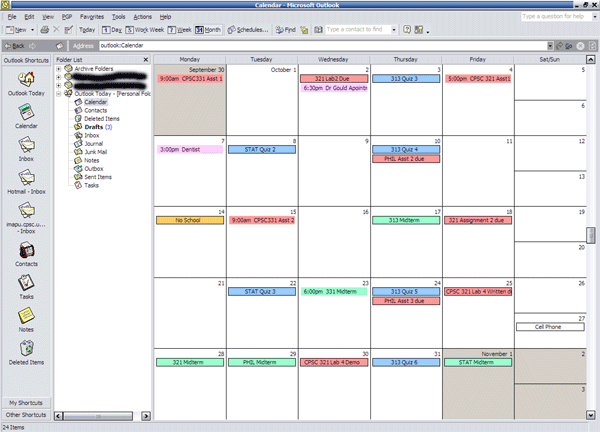
And a little sidebar thing in Netscape doesn't count it as an organizer for me. But you're telling me that not only does it handle setting events (be them all day events or specific time events), allows you to set a reminder for that event (ie, 3 days before the event remind you about it until you hit Dismiss or something of that sort), allows you to set up a Todo list (in order by when things are due), etc? That's interesting. Does the calendar also let you switch views between Month, Week, Workweek, and Day? Does it have a handy search feature?
And you never did say why Outlook isn't a good e-mail client. The only strikes it has against it is it's the most popular, which means it's a popular attack for virii, but the competent people have anti-virus software installed and it's really hard to get a virus in Outlook 2002 (seeing as you can't download .vbs and the like by default).
Last edited by Asher on 22-10-2002 at 12:16
|
|
| |
|
|
|
Rasbelin
|
|
Tampere (Tammerfors), Finland
Nov 1999
time: 07:22
|
|
Yes, I have used Netscape Mail, except that I'm now using Mozilla Mail.
No, I didn't say why MSOL or MSOLE would be bad e-mail clients, but based on what you said in the post, the calendar feature seemed to be one of the main reasons why you use it, so I referred that a calendar feature doesn't yet mean good e-mail client.
I don't argue about the viruses in MSOL and MSOLE as that seems to be under control better than before.
Anyway, back to the Calendar...
It's loaded and navigated in a usual browser window, but in the sidebar tab you can login and add appointments. It supports e-mail reminders that are sent to an e-mail account of your own choice and you can see one month, week or day at the time as per your choice, but there's also a feature to jump to a specific day and a feature so that you can browse the time period views. You can also add your horoscope and weather forecast to the calendar if you want and there's also an event directory from which you choose global or local events you want to add to your calendar. That means you can get all Canadian holidays added too. The con is that there's no search feature, but in general it has all the basic calendar features you need. If you want something more complex, then you can get a time management program.
You can use the calendar wihout Netcsape. You just have to go to the Netscape website and signup. Then you login and access your Calendar. That should give you a better picture about it.
|
|
| |
All times are GMT. The time now is 05:22.
Apolyton Time is 00:22. |
top of page
|
| archivepost |
|
Forum Rules:
You may not post new threads
You may not post replies
You may not post attachments
You may not edit your posts
|
HTML code is ON
vB code is ON
Smilies are ON
[IMG] code is ON
|
|
|
|
|
|






 22-10-2002 04:00








 Outlook
 Attachment:
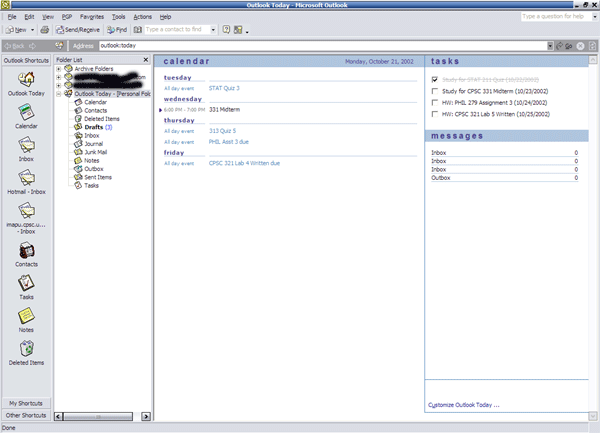
  Seems a bit stupid to me to find a gazillion other programs to do the same thing one program does just fine.


 |
|