|
| |
|

|
Martin the Dane
|
 |
Aarhus, Denmark
Feb 2000
time: 06:15
|
|
I have two pieces of good news and one bad
The first good news is: I found the error. The problem is that the black portions of the tiles that need cut-out borders are not black, they have a value of 0 to 3, the number governs witch of the four border are used. Or sort of, if/when CTP runs out of border-pixels to use, it will use the ones from the next border.
The second good news is that you will not have to remake any of your tiles, all you have to do is choose edit for each of the tiles where you have applied cutout-borders, press ok, and when done, re-save the .til-files.
The bad news is that you cannot use black or near-black-blue as black and the three first blue colours (16 bit RGB 0,0,0 through 0,0,3) are used by CtP2 to determine where to put the pixels saved as borders in the .til-file. So you will have to make sure none of your tiles have any of those four colours in them outside the cutout portion of the tiles, as this will mess up the tile in question.
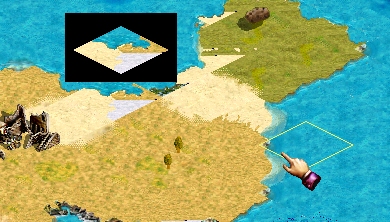
I have attached three images to illustrate the behaviour. I changed the borders between plains and tundra to the colour-coded borders as in borders.gif, then I edited the plains tile to include a 2x2 matrix of 9 "illegally" coloured pixels.

border.gif is the borders as they should be.

plains.gif is the plains-tile with some "illegal" coloured pixels.

border_in_game.gif is a screen-shot of the plains and tundra tiles in the game. Note the lower corner of the plains tile, has the wrong colours in the cut-out part.
|
|
| |
|
| |
|
| |
|
|
|
Maquiladora
|
|
Need some help here.
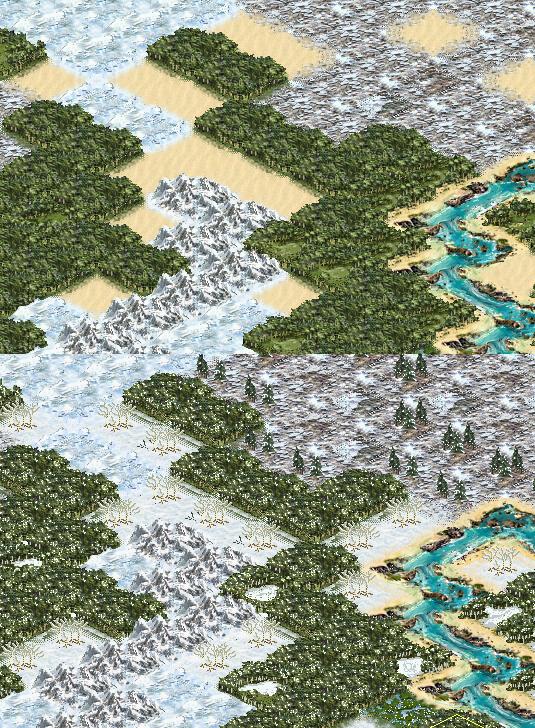
Ive replaced the desert tile graphic with a new graphic for a different type of tree terrain.
You can see in the top screenshot its the unmodded tileset and the border from the desert to the forest is fine.
In the bottom screenshot the border from my new tree graphic to forest is messed up.
I figured this is because my tree has overlapped onto the black border area, where the desert didnt in the unmodded tileset.
Also it only happens with the NE and NW border, even if i overlap in all 4 directions with the tree graphic, only the NE and NW of the tree graphic borders mess up, I assume this is because only the SE and SW border for forests appear, and so only those interfere?
Does anyone have a clue how i can get around/fix this? (while still overlapping the top two borders with the new tree)
 Attachment: berezaprob.jpg Attachment: berezaprob.jpg
This has been downloaded 90 time(s).
|
|
| |
|
|
|
Maquiladora
|
|
I checked both the border graphics and theyre both similar, nothing stands out really.
From looking at it, it looks to me as though the borders overlap each other and can decide which should be there.
Also desert is like grassland and plains, it never overlaps the border and has the similar patterns for tile rules, like Jungle and Forest have similar rules. Unfortunately I cant replace Jungle as thats already replaced by another tree graphic too.
http://apolyton.net/upload/view.php...78_gtset565.zip
|
|
| |
|
|
|
Maquiladora
|
|
I just imported the script (but my own images) from the unmodded tilefile so it would maintain the same cutouts, is that wrong?
The one i put up for download, the first desert cutouts should all be unticked though.
I also noticed im still using v1.0.0.22  (from the directory) got v1.1.0.29 from Martins site now. (from the directory) got v1.1.0.29 from Martins site now.
Last edited by Maquiladora on 22-02-2005 at 02:33
|
|
| |
|
|
|
Maquiladora
|
|
In the unmodded tile file the first desert has all 4 cutouts, thats fine, because the first desert doesnt have a tree sticking above the top 2 borders.
When i put 4 cutouts on my tree graphic obviously it cuts off the tops of the trees, but it doesnt give those crappy borders with forests anymore.
If i only put cutouts on SE/SW then the crappy borders with forests appear.
So I assume the solution here is to include the tops of the trees in the tree-to-forest border?
|
|
| |
|
|
|
Maquiladora
|
|
Thanks E, ill give that a try.
|
|
| |
|
|
|
Martin the Dane
|
|
Aarhus, Denmark
Feb 2000
time: 06:15
|
|
Hi I just updated TileEdit so now the script import/export works correctly for tiles with cutout-borders. If you have made a tile-file with a version prior to build 29 download this build, or the patch, export the tile-file as a script and reimport it. This will repair the cutout borders.
- Fixed cut-out-border issue, for script import, where borders were not cut out of the tile.
- Updated Script file format (current version is now 1.1)
VariationRules can now be in human readable format.
Last edited by Martin the Dane on 17-03-2005 at 22:48
|
|
| |
|
|
|
E
|
 |
July 24,2005 Ctp2 Tiles in sig!
May 1999
time: 21:15
|
|
THanks Martin the Dane,
I thikn its some internal game limit (though I didn't find anything on a TileIndex search in the code). So I'm re-numbering my 900 to 700 (the max seems around 876).
However, there is a problem when I renumber the TileIndex after four or five time I get an 'List Index out of bounds (68)' or 'List Index out of bounds (71)'and have to close tileedit and reopen the tile file in order to start renumbing again. It seems the tileedit cant handle a few of the changes in a sequence.
Last edited by E on 09-05-2005 at 07:53
|
|
| |
|
| |
All times are GMT. The time now is 05:15.
Apolyton Time is 00:15. |
top of page
|
|
|
Forum Rules:
You may not post new threads
You may not post replies
You may not post attachments
You may not edit your posts
|
HTML code is ON
vB code is ON
Smilies are ON
[IMG] code is ON
|
|
|
|
|
|





 24-12-2004 04:39


 here are the direct links to the files:


 Attachment:
 |
|